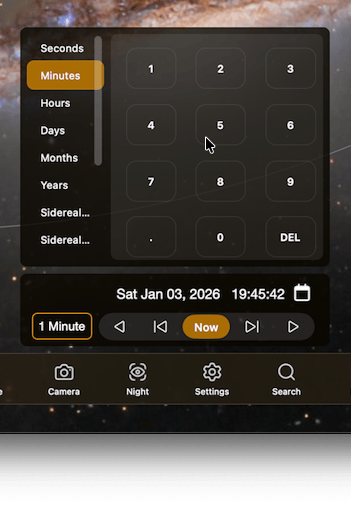
OverviewThe Time button located on the upper left in the main Sky Chart displays a set controls which let you flow the date and time dynamically, or adjust it step-by-step. Tap the Time button to show these controls; tap it again to hide them.When visible, the time flow controls contain the following items:Current Time Label: The chart’s current date and time is shown at the top of the panel. If there is an underlined segment, this indicates the time unit that will be used for flowing or stepping time (e.g. by days, hours, minutes, etc).Calendar: Tap the Calendar icon on the top right to quickly set a specific date/time. Select Set Time when done.Time Flow Arrows: In the middle of the panel is a set of VCR controls lets you start and stop the flow of time. Tap the rightmost arrow to start the flow of time continuously forward; tap the leftmost arrow to flow time continuously backward. Tap either of these arrows to stop the flow of time.Time Step Arrows: The central arrows adjust the time by a single step, equal to the time unit you have selected underneath. For example, if you selected 1 day as the time unit, tapping the center right arrow will move the time forward by 1 day - but it will not continuously run the time by one day.Now Button: Stops the flow of time, and returns to the current date and time indicated by your device’s internal clock.Time Units Button: The button in the lower left shows the time unit you will change time by when stepping or flowing time. Tapping the button brings up a panel where you can change the time unit. The unit can also be quickly changed by tapping the corresponding part of the time label at the top of the panel. For example you would tap the day part of the time and date to change the unit to days.In SkySafari Plus and Pro, the number in the time unit button is a multiplier applied to the time unit. You can tap the button to enter a new multiplier with the numeric keypad - for example: 10 minutes, 7 days, 86164 seconds (one sidereal day), or 24.659784 hours (one Martian day). Please Note: in the basic version of SkySafari, you can only use time steps of exactly one minute, one day, etc.You’ll find that different astronomical phenomena are best simulated using different time units. For example:Second - best for showing the motion of fast-moving satellites.Minute - best at showing the daily rise-and-set motion of the Sun, Moon, and Stars.Hour - best for showing the motion of Jupiter and Saturn’s moons.Day - best for showing the motion of the planets against the background stars, as they (and we!) orbit the Sun.Year - best for showing the orbital motion of binary star systems like Sirius and Alpha Centauri.Time flow is temporarily paused when another view (like Search, Object Info, or Settings) is present. You can also use the Settings to change the simulated date and time. If you are using SkySafari to control a telescope, we do not recommend using Time Flow while the telescope is connected - simulating a view other than the current date and time may result in pointing the telescope at the wrong place in the sky!
Was this page helpful?
{"docsConfig":{"theme":"mint","$schema":"https://mintlify.com/docs.json","name":"SkySafari Pro 8 Help","colors":{"primary":"#0F172A","light":"#1E293B","dark":"#0F172A"},"favicon":"/favicon.png","appearance":{"default":"dark"},"navbar":{"links":[{"label":"Support","href":"https://support.simulationcurriculum.com"}],"primary":{"type":"button","label":"Download","href":"https://apps.apple.com/app/skysafari-8-pro/id6752672420"}},"footer":{"socials":{"twitter":"https://twitter.com/SkySafariAstro","github":"https://github.com/simulation-curriculum/skysafari","website":"https://skysafariastronomy.com"}},"navigation":{"pages":[]}},"deployment":{"deploymentMetadataValue":{"subdomain":"simulationcurriculum","hasAudioNarration":false,"actualSubdomain":"simulationcurriculum","customDomains":["userguide.skysafariastronomy.com"],"gitSource":{"type":"github","owner":"quantum-k","repo":"skysafaripro-help-mintlify","deployBranch":"master","contentDirectory":"","isPrivate":true,"mountPath":"","label":""},"feedback":{"thumbs":true},"entitlements":{},"buildId":"6ae9444b4b6956dad9efceb3:success","clientVersion":"0.0.4142","searchFilterCounts":[{"language":"default","tag":"Documentation","count":74},{"language":"default","tag":"Basic Concepts","count":20},{"language":"default","tag":"App Specific","count":11},{"language":"default","tag":"Display Options","count":10},{"language":"default","tag":"Observe","count":8},{"language":"default","tag":"Selection","count":6},{"language":"default","tag":"Time \u0026 Coordinates","count":5},{"language":"default","tag":"Telescope Control","count":4},{"language":"default","tag":"Settings","count":3},{"language":"default","tag":"General Information","count":3}]},"assistantConfig":{"enableAskAiButton":false,"enableStarterQuestions":false,"enableAskAiSearchBar":true},"basePath":"","hasChatPermissions":false,"hasWebMcpPermissions":false,"toggles":[{"name":"kill-isr","enabled":true,"variant":{"name":"disabled","enabled":false,"feature_enabled":true},"impressionData":false},{"name":"custom-rbac-roles","enabled":true,"variant":{"name":"disabled","enabled":false,"feature_enabled":true},"impressionData":false},{"name":"agent-mintlify-slack","enabled":true,"variant":{"name":"disabled","enabled":false,"feature_enabled":true},"impressionData":false},{"name":"agent-integrations-settings","enabled":true,"variant":{"name":"disabled","enabled":false,"feature_enabled":true},"impressionData":false},{"name":"rbac-expansion","enabled":true,"variant":{"name":"disabled","enabled":false,"feature_enabled":true},"impressionData":false},{"name":"automations-pr-grouping","enabled":true,"variant":{"name":"disabled","enabled":false,"feature_enabled":true},"impressionData":false},{"name":"custom-prefix","enabled":true,"variant":{"name":"disabled","enabled":false,"feature_enabled":true},"impressionData":false},{"name":"analytics-v7","enabled":true,"variant":{"name":"disabled","enabled":false,"feature_enabled":true},"impressionData":false},{"name":"user-flows-analytics","enabled":true,"variant":{"name":"disabled","enabled":false,"feature_enabled":true},"impressionData":false},{"name":"no-publish-flow","enabled":true,"variant":{"name":"disabled","enabled":false,"feature_enabled":true},"impressionData":false},{"name":"workos-onboarding","enabled":true,"variant":{"name":"disabled","enabled":false,"feature_enabled":true},"impressionData":false},{"name":"snapshot-serving-live","enabled":true,"variant":{"name":"disabled","enabled":false,"feature_enabled":true},"impressionData":false},{"name":"stripTemperatureMiddleware","enabled":true,"variant":{"name":"disabled","enabled":false,"feature_enabled":true},"impressionData":false},{"name":"support-platform-pylon-zendesk","enabled":true,"variant":{"name":"disabled","enabled":false,"feature_enabled":true},"impressionData":false},{"name":"snapshot-serving","enabled":true,"variant":{"name":"disabled","enabled":false,"feature_enabled":true},"impressionData":false},{"name":"instant-rollback","enabled":true,"variant":{"name":"disabled","enabled":false,"feature_enabled":true},"impressionData":false},{"name":"granular-notifications-server","enabled":true,"variant":{"name":"disabled","enabled":false,"feature_enabled":true},"impressionData":false},{"name":"granular-notifications","enabled":true,"variant":{"name":"disabled","enabled":false,"feature_enabled":true},"impressionData":false},{"name":"automations-fable","enabled":true,"variant":{"name":"disabled","enabled":false,"feature_enabled":true},"impressionData":false},{"name":"fixed-ai-action-pricing","enabled":true,"variant":{"name":"disabled","enabled":false,"feature_enabled":true},"impressionData":false},{"name":"automation-resolve-merge-conflict","enabled":true,"variant":{"name":"disabled","enabled":false,"feature_enabled":true},"impressionData":false},{"name":"scoped-publishing","enabled":true,"variant":{"name":"disabled","enabled":false,"feature_enabled":true},"impressionData":false},{"name":"mintql","enabled":true,"variant":{"name":"disabled","enabled":false,"feature_enabled":true},"impressionData":false},{"name":"page-level-analytics","enabled":true,"variant":{"name":"disabled","enabled":false,"feature_enabled":true},"impressionData":false},{"name":"editor-version-history-v2","enabled":true,"variant":{"name":"disabled","enabled":false,"feature_enabled":true},"impressionData":false},{"name":"billing-page-v2","enabled":true,"variant":{"name":"disabled","enabled":false,"feature_enabled":true},"impressionData":false},{"name":"full-page-search","enabled":true,"variant":{"name":"disabled","enabled":false,"feature_enabled":true},"impressionData":false},{"name":"workspace-projects","enabled":true,"variant":{"name":"disabled","enabled":false,"feature_enabled":true},"impressionData":false},{"name":"assistant-v5","enabled":true,"variant":{"name":"disabled","enabled":false,"feature_enabled":true},"impressionData":false},{"name":"fork-pr-previews","enabled":true,"variant":{"name":"disabled","enabled":false,"feature_enabled":true},"impressionData":false},{"name":"revalidation-jwt","enabled":true,"variant":{"name":"disabled","enabled":false,"feature_enabled":true},"impressionData":false},{"name":"workos-sso-scim","enabled":true,"variant":{"name":"disabled","enabled":false,"feature_enabled":true},"impressionData":false},{"name":"hobby-abuse-scan","enabled":true,"variant":{"name":"disabled","enabled":false,"feature_enabled":true},"impressionData":false},{"name":"dashboard-inbox","enabled":true,"variant":{"name":"disabled","enabled":false,"feature_enabled":true},"impressionData":false},{"name":"workos-signup","enabled":true,"variant":{"name":"disabled","enabled":false,"feature_enabled":true},"impressionData":false},{"name":"turbopuffer-dual-write","enabled":true,"variant":{"name":"disabled","enabled":false,"feature_enabled":true},"impressionData":false},{"name":"workos-enabled","enabled":true,"variant":{"name":"disabled","enabled":false,"feature_enabled":true},"impressionData":false},{"name":"approve-review-flow","enabled":true,"variant":{"name":"disabled","enabled":false,"feature_enabled":true},"impressionData":false},{"name":"editor-metadata","enabled":true,"variant":{"name":"disabled","enabled":false,"feature_enabled":true},"impressionData":false},{"name":"sso-setup-deadline-banner","enabled":true,"variant":{"name":"disabled","enabled":false,"feature_enabled":true},"impressionData":false},{"name":"turbopuffer-serve","enabled":true,"variant":{"name":"disabled","enabled":false,"feature_enabled":true},"impressionData":false},{"name":"live-agents","enabled":true,"variant":{"name":"disabled","enabled":false,"feature_enabled":true},"impressionData":false},{"name":"llms-txt-v2","enabled":true,"variant":{"name":"disabled","enabled":false,"feature_enabled":true},"impressionData":false}],"googleFontsInlined":false},"customCss":[],"page":{"pagePath":"app-specific/time-flow-help","slug":"/app-specific/time-flow-help","pageMetadata":{"title":"Time Flow Help","description":"Documentation for Time Flow Help","href":"/app-specific/time-flow-help"},"description":{"compiledSource":"\"use strict\";\nconst {jsx: _jsx} = arguments[0];\nconst {useMDXComponents: _provideComponents} = arguments[0];\nfunction _createMdxContent(props) {\n const _components = {\n p: \"p\",\n ..._provideComponents(),\n ...props.components\n };\n return _jsx(_components.p, {\n children: \"Documentation for Time Flow Help\"\n });\n}\nfunction MDXContent(props = {}) {\n const {wrapper: MDXLayout} = {\n ..._provideComponents(),\n ...props.components\n };\n return MDXLayout ? _jsx(MDXLayout, {\n ...props,\n children: _jsx(_createMdxContent, {\n ...props\n })\n }) : _createMdxContent(props);\n}\nreturn {\n default: MDXContent\n};\n","frontmatter":{},"scope":{}},"pageType":"default","mdx":{"mdxSource":{"compiledSource":"\"use strict\";const{Fragment:_Fragment,jsx:_jsx,jsxs:_jsxs}=arguments[0];const{useMDXComponents:_provideComponents}=arguments[0];function _createMdxContent(props){const _components={p:`p`,strong:`strong`,..._provideComponents(),...props.components},{Heading,OptimizedImage}=_components;if(!Heading)_missingMdxReference(`Heading`,true);if(!OptimizedImage)_missingMdxReference(`OptimizedImage`,true);return _jsxs(_Fragment,{children:[_jsx(OptimizedImage,{src:`https://mintcdn.com/simulationcurriculum/R1iQGpT_e4uhRH-4/images/time-flow-test.png?fit=max\u0026auto=format\u0026n=R1iQGpT_e4uhRH-4\u0026q=85\u0026s=d1cad9e74fb9bec159c67f575c1f59ea`,alt:`Time Flow`,\"data-og-width\":`351`,width:`351`,\"data-og-height\":`507`,height:`507`,\"data-path\":`images/time-flow-test.png`,\"data-optimize\":`true`,\"data-opv\":`3`,srcset:`https://mintcdn.com/simulationcurriculum/R1iQGpT_e4uhRH-4/images/time-flow-test.png?w=280\u0026fit=max\u0026auto=format\u0026n=R1iQGpT_e4uhRH-4\u0026q=85\u0026s=44bb8e2482a982d151043d5af2574561 280w, https://mintcdn.com/simulationcurriculum/R1iQGpT_e4uhRH-4/images/time-flow-test.png?w=560\u0026fit=max\u0026auto=format\u0026n=R1iQGpT_e4uhRH-4\u0026q=85\u0026s=4e171132bf8bf8ec7dcc52f7bd95dba6 560w, https://mintcdn.com/simulationcurriculum/R1iQGpT_e4uhRH-4/images/time-flow-test.png?w=840\u0026fit=max\u0026auto=format\u0026n=R1iQGpT_e4uhRH-4\u0026q=85\u0026s=fb3e41b5f5a52b6d159ced518a5b85f7 840w, https://mintcdn.com/simulationcurriculum/R1iQGpT_e4uhRH-4/images/time-flow-test.png?w=1100\u0026fit=max\u0026auto=format\u0026n=R1iQGpT_e4uhRH-4\u0026q=85\u0026s=e88bb24e5b32daa731b01ca3d1065981 1100w, https://mintcdn.com/simulationcurriculum/R1iQGpT_e4uhRH-4/images/time-flow-test.png?w=1650\u0026fit=max\u0026auto=format\u0026n=R1iQGpT_e4uhRH-4\u0026q=85\u0026s=8e56128ca2479897af7e714ae406fe7e 1650w, https://mintcdn.com/simulationcurriculum/R1iQGpT_e4uhRH-4/images/time-flow-test.png?w=2500\u0026fit=max\u0026auto=format\u0026n=R1iQGpT_e4uhRH-4\u0026q=85\u0026s=983c5572e0fa97bd8648622bc29d6251 2500w`}),`\n`,_jsx(Heading,{level:`2`,id:`time-flow-help`,children:`Time Flow Help`}),`\n`,_jsx(_components.p,{children:`Overview`}),`\n`,_jsxs(_components.p,{children:[`The `,_jsx(_components.strong,{children:`Time`}),` button located on the upper left in the main Sky Chart displays a set controls which let you flow the date and time dynamically, or adjust it step-by-step. Tap the `,_jsx(_components.strong,{children:`Time`}),` button to show these controls; tap it again to hide them.`]}),`\n`,_jsx(_components.p,{children:`When visible, the time flow controls contain the following items:`}),`\n`,_jsxs(_components.p,{children:[_jsx(_components.strong,{children:`Current Time Label`}),`: The chart’s current date and time is shown at the top of the panel. If there is an underlined segment, this indicates the time unit that will be used for flowing or stepping time (e.g. by days, hours, minutes, etc).`]}),`\n`,_jsxs(_components.p,{children:[_jsx(_components.strong,{children:`Calendar`}),`: Tap the Calendar icon on the top right to quickly set a specific date/time. Select Set Time when done.`]}),`\n`,_jsxs(_components.p,{children:[_jsx(_components.strong,{children:`Time Flow Arrows`}),`: In the middle of the panel is a set of VCR controls lets you start and stop the flow of time. Tap the rightmost arrow to start the flow of time continuously forward; tap the leftmost arrow to flow time continuously backward. Tap either of these arrows to stop the flow of time.`]}),`\n`,_jsxs(_components.p,{children:[_jsx(_components.strong,{children:`Time Step Arrows`}),`: The central arrows adjust the time by a single step, equal to the time unit you have selected underneath. For example, if you selected 1 day as the time unit, tapping the center right arrow will move the time forward by 1 day - but it will not continuously run the time by one day.`]}),`\n`,_jsx(_components.p,{children:`Now Button: Stops the flow of time, and returns to the current date and time indicated by your device’s internal clock.`}),`\n`,_jsxs(_components.p,{children:[_jsx(_components.strong,{children:`Time Units Button`}),`: The button in the lower left shows the time unit you will change time by when stepping or flowing time. Tapping the button brings up a panel where you can change the time unit. The unit can also be quickly changed by tapping the corresponding part of the time label at the top of the panel. For example you would tap the day part of the time and date to change the unit to days.`]}),`\n`,_jsx(_components.p,{children:`In SkySafari Plus and Pro, the number in the time unit button is a multiplier applied to the time unit. You can tap the button to enter a new multiplier with the numeric keypad - for example: 10 minutes, 7 days, 86164 seconds (one sidereal day), or 24.659784 hours (one Martian day). Please Note: in the basic version of SkySafari, you can only use time steps of exactly one minute, one day, etc.`}),`\n`,_jsx(_components.p,{children:`You’ll find that different astronomical phenomena are best simulated using different time units. For example:`}),`\n`,_jsxs(_components.p,{children:[_jsx(_components.strong,{children:`Second -`}),` best for showing the motion of fast-moving satellites.`]}),`\n`,_jsxs(_components.p,{children:[_jsx(_components.strong,{children:`Minute -`}),` best at showing the daily rise-and-set motion of the Sun, Moon, and Stars.`]}),`\n`,_jsxs(_components.p,{children:[_jsx(_components.strong,{children:`Hour -`}),` best for showing the motion of Jupiter and Saturn’s moons.`]}),`\n`,_jsx(_components.p,{children:`Day - best for showing the motion of the planets against the background stars, as they (and we!) orbit the Sun.`}),`\n`,_jsxs(_components.p,{children:[_jsx(_components.strong,{children:`Year -`}),` best for showing the orbital motion of binary star systems like Sirius and Alpha Centauri.`]}),`\n`,_jsx(_components.p,{children:`Time flow is temporarily paused when another view (like Search, Object Info, or Settings) is present. You can also use the Settings to change the simulated date and time. If you are using SkySafari to control a telescope, we do not recommend using Time Flow while the telescope is connected - simulating a view other than the current date and time may result in pointing the telescope at the wrong place in the sky!`})]})}function MDXContent(props={}){const{wrapper:MDXLayout}={..._provideComponents(),...props.components};return MDXLayout?_jsx(MDXLayout,{...props,children:_jsx(_createMdxContent,{...props})}):_createMdxContent(props)}return{default:MDXContent};function _missingMdxReference(id,component){throw new Error(`Expected `+(component?`component`:`object`)+\" `\"+id+\"` to be defined: you likely forgot to import, pass, or provide it.\")}","frontmatter":{},"scope":{"config":{},"pageMetadata":{"title":"Time Flow Help","description":"Documentation for Time Flow Help","href":"/app-specific/time-flow-help"}}},"mdxSourceWithNoJs":null},"mdxExtracts":{"tableOfContents":[{"title":"Time Flow Help","slug":"time-flow-help","depth":2,"children":[]}],"codeExamples":{}},"jsLinks":["/_mintlify/custom/simulationcurriculum/e7b4eaf0061ac345/mintlify/link-config.js","/_mintlify/custom/simulationcurriculum/572088fbb80e9db5/mintlify/zendesk-widget-loader.js"],"subdomain":"simulationcurriculum","siteName":"SkySafari Pro 8 Help","title":"Time Flow Help - SkySafari Pro 8 Help","navMaps":{"firstHrefInVersion":{},"firstHrefInLanguage":{}},"lastModified":"2026-01-05T07:51:55.942Z","originalFileLocation":"app-specific/time-flow-help.mdx"},"headHtml":"\u003cscript data-mint-head>(function(){var d=document.documentElement,p=null;if(!p){try{p=localStorage.getItem(\"isDarkMode\")}catch(e){}if(p==='true')p='dark';else if(p==='false')p='light';if(p!=='light'\u0026\u0026p!=='dark'\u0026\u0026p!=='system')p=\"dark\"}var r=p==='system'?(matchMedia(\"(prefers-color-scheme: dark)\").matches?'dark':'light'):p;d.classList.remove(r==='dark'?'light':'dark');d.classList.add(r);d.setAttribute(\"data-theme-preference\",p)})();\u003c/script>\u003cmeta data-mint-head name=\"description\" content=\"Documentation for Time Flow Help\">\u003cmeta data-mint-head name=\"application-name\" content=\"SkySafari Pro 8 Help\">\u003cmeta data-mint-head name=\"generator\" content=\"Mintlify\">\u003clink data-mint-head rel=\"icon\" type=\"image/png\" sizes=\"192x192\" href=\"/mintlify-assets/_mintlify/favicons/simulationcurriculum/-qhhl1kO1_8lb9RW/_generated/favicon/android-chrome-192x192.png\" media=\"(prefers-color-scheme: light)\">\u003clink data-mint-head rel=\"apple-touch-icon\" type=\"image/png\" sizes=\"180x180\" href=\"/mintlify-assets/_mintlify/favicons/simulationcurriculum/-qhhl1kO1_8lb9RW/_generated/favicon/apple-touch-icon.png\">\u003clink data-mint-head rel=\"icon\" type=\"image/png\" sizes=\"16x16\" href=\"/mintlify-assets/_mintlify/favicons/simulationcurriculum/-qhhl1kO1_8lb9RW/_generated/favicon/favicon-16x16.png\" media=\"(prefers-color-scheme: light)\">\u003clink data-mint-head rel=\"icon\" type=\"image/png\" sizes=\"32x32\" href=\"/mintlify-assets/_mintlify/favicons/simulationcurriculum/-qhhl1kO1_8lb9RW/_generated/favicon/favicon-32x32.png\" media=\"(prefers-color-scheme: light)\">\u003clink data-mint-head rel=\"shortcut icon\" type=\"image/x-icon\" href=\"/mintlify-assets/_mintlify/favicons/simulationcurriculum/-qhhl1kO1_8lb9RW/_generated/favicon/favicon.ico\" media=\"(prefers-color-scheme: light)\">\u003clink data-mint-head rel=\"icon\" type=\"image/png\" sizes=\"192x192\" href=\"/mintlify-assets/_mintlify/favicons/simulationcurriculum/-qhhl1kO1_8lb9RW/_generated/favicon-dark/android-chrome-192x192.png\" media=\"(prefers-color-scheme: dark)\">\u003clink data-mint-head rel=\"icon\" type=\"image/png\" sizes=\"16x16\" href=\"/mintlify-assets/_mintlify/favicons/simulationcurriculum/-qhhl1kO1_8lb9RW/_generated/favicon-dark/favicon-16x16.png\" media=\"(prefers-color-scheme: dark)\">\u003clink data-mint-head rel=\"icon\" type=\"image/png\" sizes=\"32x32\" href=\"/mintlify-assets/_mintlify/favicons/simulationcurriculum/-qhhl1kO1_8lb9RW/_generated/favicon-dark/favicon-32x32.png\" media=\"(prefers-color-scheme: dark)\">\u003clink data-mint-head rel=\"shortcut icon\" type=\"image/x-icon\" href=\"/mintlify-assets/_mintlify/favicons/simulationcurriculum/-qhhl1kO1_8lb9RW/_generated/favicon-dark/favicon.ico\" media=\"(prefers-color-scheme: dark)\">\u003cmeta data-mint-head property=\"og:title\" content=\"Time Flow Help - SkySafari Pro 8 Help\">\u003cmeta data-mint-head property=\"og:description\" content=\"Documentation for Time Flow Help\">\u003cmeta data-mint-head property=\"og:site_name\" content=\"SkySafari Pro 8 Help\">\u003cmeta data-mint-head property=\"og:url\" content=\"https://userguide.skysafariastronomy.com/app-specific/time-flow-help\">\u003cmeta data-mint-head property=\"og:type\" content=\"website\">\u003cmeta data-mint-head property=\"og:image\" content=\"https://simulationcurriculum.mintlify.site/_mintlify/api/og/v2?division=App+Specific\u0026amp;title=Time+Flow+Help\u0026amp;description=Documentation+for+Time+Flow+Help\u0026amp;theme=6ce1add74b06e4a3593d68a4\u0026amp;signature=185f6bf4258dd685a2a245cc6be6b32d681f75bce652ab0dda5a5bb56ecec433\">\u003cmeta data-mint-head property=\"og:image:width\" content=\"1200\">\u003cmeta data-mint-head property=\"og:image:height\" content=\"630\">\u003cmeta data-mint-head name=\"twitter:card\" content=\"summary_large_image\">\u003cmeta data-mint-head name=\"twitter:title\" content=\"Time Flow Help - SkySafari Pro 8 Help\">\u003cmeta data-mint-head name=\"twitter:description\" content=\"Documentation for Time Flow Help\">\u003cmeta data-mint-head name=\"twitter:image\" content=\"https://simulationcurriculum.mintlify.site/_mintlify/api/og/v2?division=App+Specific\u0026amp;title=Time+Flow+Help\u0026amp;description=Documentation+for+Time+Flow+Help\u0026amp;theme=6ce1add74b06e4a3593d68a4\u0026amp;signature=185f6bf4258dd685a2a245cc6be6b32d681f75bce652ab0dda5a5bb56ecec433\">\u003cmeta data-mint-head name=\"twitter:image:width\" content=\"1200\">\u003cmeta data-mint-head name=\"twitter:image:height\" content=\"630\">\u003cmeta data-mint-head name=\"msapplication-config\" content=\"/mintlify-assets/_mintlify/favicons/simulationcurriculum/-qhhl1kO1_8lb9RW/_generated/favicon/browserconfig.xml\">\u003cmeta data-mint-head name=\"apple-mobile-web-app-title\" content=\"SkySafari Pro 8 Help\">\u003cmeta data-mint-head name=\"msapplication-TileColor\" content=\"#0F172A\">\u003clink data-mint-head rel=\"canonical\" href=\"https://userguide.skysafariastronomy.com/app-specific/time-flow-help\">\u003clink data-mint-head rel=\"alternate\" type=\"application/xml\" href=\"/sitemap.xml\">\u003clink data-mint-head rel=\"alternate\" type=\"text/markdown\" href=\"/app-specific/time-flow-help.md\">\u003cscript data-mint-head type=\"application/ld+json\">{\"@context\":\"https://schema.org\",\"@graph\":[{\"@type\":\"Organization\",\"@id\":\"https://userguide.skysafariastronomy.com/#organization\",\"name\":\"SkySafari Pro 8 Help\",\"url\":\"https://userguide.skysafariastronomy.com\"},{\"@type\":\"WebSite\",\"@id\":\"https://userguide.skysafariastronomy.com#website\",\"name\":\"SkySafari Pro 8 Help\",\"url\":\"https://userguide.skysafariastronomy.com\",\"publisher\":{\"@id\":\"https://userguide.skysafariastronomy.com/#organization\"}},{\"@type\":\"WebPage\",\"@id\":\"https://userguide.skysafariastronomy.com/app-specific/time-flow-help#webpage\",\"url\":\"https://userguide.skysafariastronomy.com/app-specific/time-flow-help\",\"name\":\"Time Flow Help\",\"description\":\"Documentation for Time Flow Help\",\"dateModified\":\"2026-01-05T07:51:55.942Z\",\"isPartOf\":{\"@id\":\"https://userguide.skysafariastronomy.com#website\"},\"breadcrumb\":{\"@id\":\"https://userguide.skysafariastronomy.com/app-specific/time-flow-help#breadcrumb\"}},{\"@type\":\"BreadcrumbList\",\"@id\":\"https://userguide.skysafariastronomy.com/app-specific/time-flow-help#breadcrumb\",\"itemListElement\":[{\"@type\":\"ListItem\",\"position\":1,\"name\":\"App Specific\",\"item\":\"https://userguide.skysafariastronomy.com/app-specific/sky-chart-help-ios\"},{\"@type\":\"ListItem\",\"position\":2,\"name\":\"Time Flow Help\",\"item\":\"https://userguide.skysafariastronomy.com/app-specific/time-flow-help\"}]},{\"@type\":[\"Article\",\"TechArticle\"],\"@id\":\"https://userguide.skysafariastronomy.com/app-specific/time-flow-help#article\",\"headline\":\"Time Flow Help\",\"name\":\"Time Flow Help\",\"description\":\"Documentation for Time Flow Help\",\"url\":\"https://userguide.skysafariastronomy.com/app-specific/time-flow-help\",\"mainEntityOfPage\":{\"@id\":\"https://userguide.skysafariastronomy.com/app-specific/time-flow-help#webpage\"},\"dateModified\":\"2026-01-05T07:51:55.942Z\",\"publisher\":{\"@id\":\"https://userguide.skysafariastronomy.com/#organization\"},\"isPartOf\":{\"@id\":\"https://userguide.skysafariastronomy.com#website\"}}]}\u003c/script>\u003cscript data-mint-head type=\"application/ld+json\">{\"@context\":\"https://schema.org\",\"@type\":\"WebSite\",\"name\":\"SkySafari Pro 8 Help\",\"publisher\":{\"@type\":\"Organization\",\"name\":\"SkySafari Pro 8 Help\"},\"provider\":{\"@type\":\"Organization\",\"name\":\"Mintlify\",\"url\":\"https://mintlify.com\"}}\u003c/script>","agentPointerHref":"/app-specific/time-flow-help.md","siteName":"SkySafari Pro 8 Help","nav":{"global":null,"anchors":[{"anchor":"Documentation","icon":"book-open","groups":[{"group":"Getting Started","pages":[{"title":"Main Menu","href":"/main-menu"},{"title":"Introduction","href":"/introduction"},{"title":"Quick Start","href":"/quick-start"}]},{"group":"General Information","pages":[{"title":"Links","href":"/general/links"},{"title":"Clear Sky Chart","href":"/general/clear-sky-chart"},{"title":"Data Migration Help","href":"/general/data-migration-help"}]},{"group":"App Specific","pages":[{"title":"Sky Chart Help (iOS)","href":"/app-specific/sky-chart-help-ios"},{"title":"Search Help","description":"Documentation for Search Help","href":"/app-specific/search-help"},{"title":"Time Flow Help","href":"/app-specific/time-flow-help"},{"title":"Scope Control Help","description":"Documentation for Scope Control Help","href":"/app-specific/scope-control-help"},{"title":"Image Gallery Help","href":"/app-specific/image-gallery-help"},{"title":"Smarteye And Camera Configuration Help","href":"/app-specific/smarteye-and-camera-configuration-help"},{"title":"Tonight At A Glance Help","href":"/app-specific/tonight-at-a-glance-help"},{"title":"Compass And Ar Help","href":"/app-specific/compass-and-ar-help"},{"title":"Night Vision Help","href":"/app-specific/night-vision-help"},{"title":"Calendar Help","href":"/app-specific/calendar-help"},{"title":"Social Stargazing Help","href":"/app-specific/social-stargazing-help"}]},{"group":"Observe","pages":[{"title":"Events Help","href":"/app-specific/observe-help/events-help"},{"title":"Planner Help","href":"/app-specific/observe-help/planner-help"},{"title":"Observing Lists Help","href":"/app-specific/observe-help/observing-lists-help"},{"title":"Observations Help","href":"/app-specific/observe-help/observations-help"},{"title":"Observing Sessions Help","href":"/app-specific/observe-help/observing-sessions-help"},{"title":"Observing Sites Help","href":"/app-specific/observe-help/observing-sites-help"},{"title":"Scope Display Help","href":"/app-specific/observe-help/scope-display-help"},{"title":"Equipment Help","href":"/app-specific/observe-help/equipment-help"}]},{"group":"Selection","pages":[{"title":"Object Info Help","href":"/app-specific/selection-help/object-info-help"},{"title":"Center Object Help","href":"/app-specific/selection-help/center-object-help"},{"title":"Graph Object Help","href":"/app-specific/selection-help/graph-object-help"},{"title":"Orbit Object Help","href":"/app-specific/selection-help/orbit-object-help"},{"title":"Measure From Help","href":"/app-specific/selection-help/measure-from-help"},{"title":"3D Galaxy View","href":"/app-specific/selection-help/3d-galaxy-view"}]},{"group":"Time \u0026 Coordinates","pages":[{"title":"Date And Time Help","href":"/app-specific/settings-help/time-and-coordinates-help/date-and-time-help"},{"title":"Location Help","href":"/app-specific/settings-help/time-and-coordinates-help/location-help"},{"title":"Coordinates Help","href":"/app-specific/settings-help/time-and-coordinates-help/coordinates-help"},{"title":"Precession Help","href":"/app-specific/settings-help/time-and-coordinates-help/precession-help"},{"title":"Formats Help","href":"/app-specific/settings-help/time-and-coordinates-help/formats-help"}]},{"group":"Display Options","pages":[{"title":"Appearance And Behavior Help","href":"/app-specific/settings-help/display-options-help/appearance-and-behavior-help"},{"title":"Notifications Help","href":"/app-specific/settings-help/display-options-help/notifications-help"},{"title":"Horizon And Sky Help","href":"/app-specific/settings-help/display-options-help/horizon-and-sky-help"},{"title":"Solar System Help","href":"/app-specific/settings-help/display-options-help/solar-system-help"},{"title":"Stars Help","href":"/app-specific/settings-help/display-options-help/stars-help"},{"title":"Deep Sky Help","href":"/app-specific/settings-help/display-options-help/deep-sky-help"},{"title":"Milky Way Help","href":"/app-specific/settings-help/display-options-help/milky-way-help"},{"title":"Constellations Help","href":"/app-specific/settings-help/display-options-help/constellations-help"},{"title":"Grids And Reference Help","href":"/app-specific/settings-help/display-options-help/grids-and-reference-help"},{"title":"H R Diagram Help","href":"/app-specific/settings-help/display-options-help/h-r-diagram-help"}]},{"group":"Telescope Control","pages":[{"title":"Scope Presets Help","href":"/app-specific/settings-help/telescope-control-help/scope-presets-help"},{"title":"Scope Settings Help","href":"/app-specific/settings-help/telescope-control-help/scope-settings-help"},{"title":"Celestron Wi Fi Help","href":"/app-specific/settings-help/telescope-control-help/celestron-wi-fi-help"},{"title":"StarSense Explorer","href":"/app-specific/settings-help/telescope-control-help/starsense-explorer-help"}]},{"group":"Settings","pages":[{"title":"Settings Help Menu","href":"/app-specific/settings-help/settings-help-menu"},{"title":"Settings Files Help","href":"/app-specific/settings-help/settings-files-help"},{"title":"Storage Help","href":"/app-specific/settings-help/storage-help"}]},{"group":"Account","pages":[{"title":"Livesky Help","href":"/app-specific/settings-help/account-help/livesky-help"}]},{"group":"Basic Concepts","pages":[{"title":"Basic Concepts Menu","href":"/general/basic-concepts/basic-concepts-menu"},{"title":"Astronomical Coordinates","href":"/general/basic-concepts/astronomical-coordinates"},{"title":"Date And Time","href":"/general/basic-concepts/date-and-time"},{"title":"Deep Sky Objects","href":"/general/basic-concepts/deep-sky-objects"},{"title":"Double Multiple And Binary Stars","href":"/general/basic-concepts/double-multiple-and-binary-stars"},{"title":"Galaxies","href":"/general/basic-concepts/galaxies"},{"title":"How Stars Die","href":"/general/basic-concepts/how-stars-die"},{"title":"Motion Of The Planets","href":"/general/basic-concepts/motion-of-the-planets"},{"title":"Nebulae","href":"/general/basic-concepts/nebulae"},{"title":"Orbital Mechanics","href":"/general/basic-concepts/orbital-mechanics"},{"title":"Phases And Tides Of The Moon","href":"/general/basic-concepts/phases-and-tides-of-the-moon"},{"title":"Precession Of The Equinoxes","href":"/general/basic-concepts/precession-of-the-equinoxes"},{"title":"Properties Of The Stars","href":"/general/basic-concepts/properties-of-the-stars"},{"title":"Solar And Lunar Eclipses","href":"/general/basic-concepts/solar-and-lunar-eclipses"},{"title":"Star Clusters","href":"/general/basic-concepts/star-clusters"},{"title":"Star Formation And Evolution","href":"/general/basic-concepts/star-formation-and-evolution"},{"title":"Star Names And Catalogs","href":"/general/basic-concepts/star-names-and-catalogs"},{"title":"The Milky Way","href":"/general/basic-concepts/the-milky-way"},{"title":"The Seasons","href":"/general/basic-concepts/the-seasons"},{"title":"Variable Stars Novae And Supernovae","href":"/general/basic-concepts/variable-stars-novae-and-supernovae"}]}]}]},"basePath":"","title":"Time Flow Help - SkySafari Pro 8 Help","buildId":"dpl_G2Qd45vZZ7MkBiGF9yYx8ZsbbKXX","deploymentId":"dpl_G2Qd45vZZ7MkBiGF9yYx8ZsbbKXX","dynamics":["a74be98ba7"],"chunks":["zoom-image-lightbox-BLUesUNd.js","lightbox-handle-r17bVUz3.js"]}