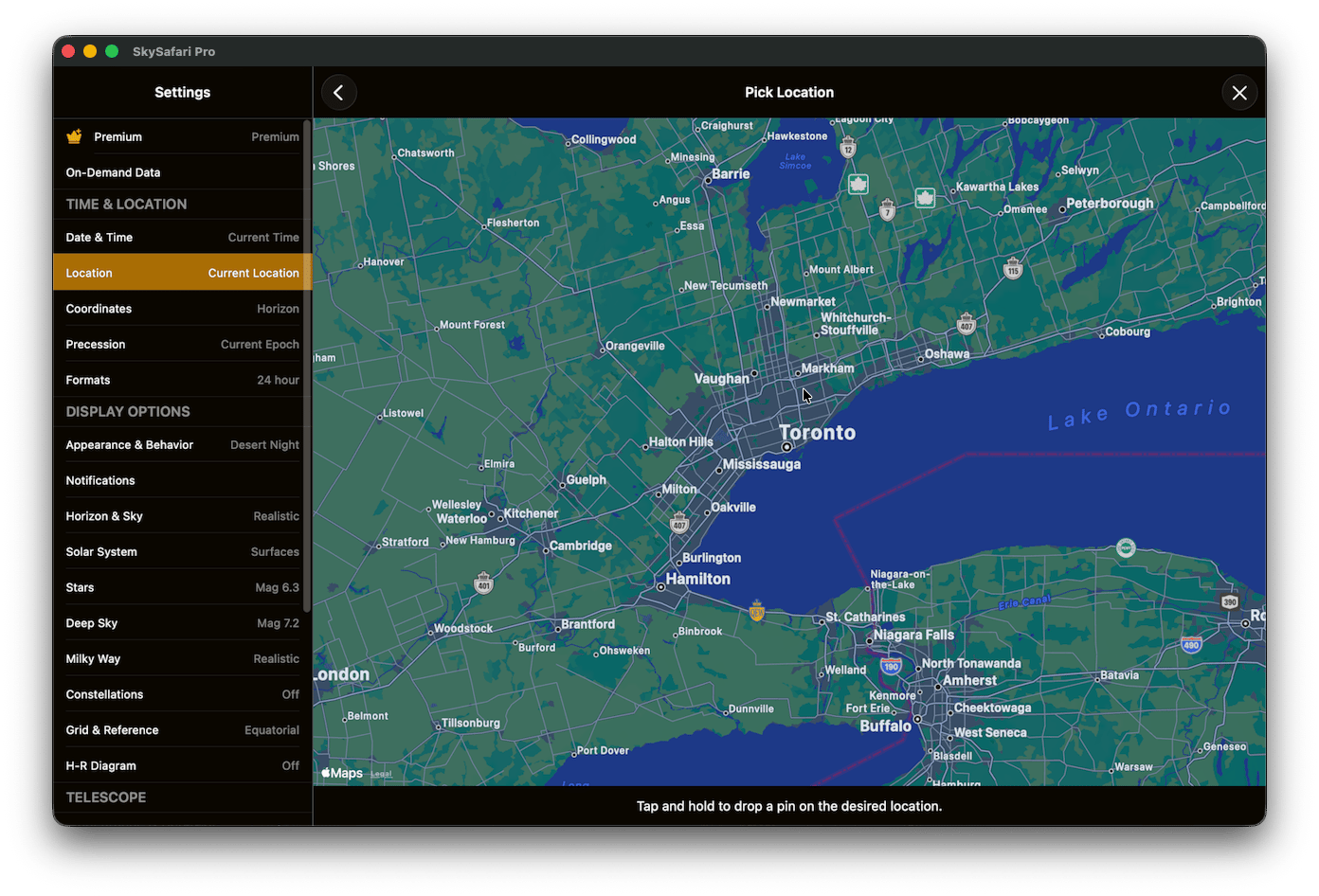
SkySafari needs to know your location on Earth in order to correctly plot the location of objects in the sky. You can set this in the Location view from the main Settings screen. Four pieces of information are necessary:Latitude - distance north or south of the equatorLongitude - distance east or west of the prime meridianElevation - altitude above sea levelTime Zone - local time offset in hours from Universal Time (UT), previously called Greenwich Mean Time (GMT)A time zone west of (behind) Universal Time is negative; time zones east (ahead) of UT are positive. Always enter the time zone offset for Standard Time only. Don’t enter a Daylight Saving Time offset here. SkySafari will automatically correct for Daylight Saving Time. See the Date & Time Settings Help.Please note: in SkySafari Plus and Pro, you cannot change your location settings while you are orbiting another object in the solar system. These settings only refer to your location on Earth. To change them, you first need to return home to Earth. See the Orbit button Help for more information.
Use Current Location
Tap the “Use Current Location” button to automatically determine your location from your iPhone’s Location Manager, your Android device’s GPS, or other information supplied by your internet service. When the location information is obtained this way, your location name is automatically filled in as “Current Location”.
Choose Location From Map
If your mobile device is connected to the internet, you can use Apple or Google maps to choose a new location. This is useful if you want to see the sky from a place other than where you are located right now. You could use this feature to view the sky as it will appear from a distant city or island where you’re planning to take a vacation.After you tap this option, a map view will appear, centered on your current location. You can pinch or swipe this map to zoom or move around, just as you would with the built-in Maps app on your device.Tap and hold to drop a pin on your desired location. Then tap “X” at the top of the screen. SkySafari will use the longitude, latitude, and location name where your pin dropped. SkySafari will make a best guess about the elevation and time zone, since this information is not available from Apple or Google Maps.
Choose Location From List
If your mobile device is not connected to the internet, and GPS or Wi-Fi-based location services are not available, you can choose a location from a searchable list of thousands of cities in SkySafari’s database.Tap “Choose from List” to see a list of locations, sorted by country. Choose a country to see a list of cities in that country. Choosing a city will automatically fill in the data for you. You can also search for any location in SkySafari’s database by entering its name in the search field above the list of countries. If SkySafari finds more than one location which matches the name you entered, it will list all matching locations, and you can choose the one you want. If there is only one matching location, SkySafari will use it.The location database in SkySafari’s basic version includes every city worldwide with more than 100,000 inhabitants - a total of over 4,000 cities. In SkySafari Plus and Pro, the location database includes all cities with more than 10,000 people, plus more than 500 observatories, star parties, NASA centers, and other “astronomical” locations - a grand total of over 30,000 locations in all!
Save as User-Defined Observing Site
Tap the “Save as User-Defined Observing Site” to store a manually-entered location for retrieval later. To retrieve a user-defined site, tap the “Choose Location from List” button, then choose the “User-Defined Observing Sites” group. You must name your location something other than “Current Location” before saving it as user-defined. If you choose the same name as an existing user-defined site, that existing site will be overwritten with the new longitude, latitude, etc. currently displayed in the Location view.You can delete user-defined sites as follows:Tap the “Choose Location from List” button. Choose the “User-Defined Observing Sites” group at the start of the location groups list.Tap the “Edit” button at the top of the user-defined sites list.Tap the small, red, round, ”-” button for each user-defined site you wish to delete. Confirm by tapping the red “Delete” button that appears to the right.When you are finished, tap the “X” button at the top of the user-defined sites list.Please Note: the User-Defined Observing Sites feature only available in SkySafari Plus and Pro.
Was this page helpful?
{"docsConfig":{"theme":"mint","$schema":"https://mintlify.com/docs.json","name":"SkySafari Pro 8 Help","colors":{"primary":"#0F172A","light":"#1E293B","dark":"#0F172A"},"favicon":"/favicon.png","appearance":{"default":"dark"},"navbar":{"links":[{"label":"Support","href":"https://support.simulationcurriculum.com"}],"primary":{"type":"button","label":"Download","href":"https://apps.apple.com/app/skysafari-8-pro/id6752672420"}},"footer":{"socials":{"twitter":"https://twitter.com/SkySafariAstro","github":"https://github.com/simulation-curriculum/skysafari","website":"https://skysafariastronomy.com"}},"navigation":{"pages":[]}},"deployment":{"deploymentMetadataValue":{"subdomain":"simulationcurriculum","hasAudioNarration":false,"actualSubdomain":"simulationcurriculum","customDomains":["userguide.skysafariastronomy.com"],"gitSource":{"type":"github","owner":"quantum-k","repo":"skysafaripro-help-mintlify","deployBranch":"master","contentDirectory":"","isPrivate":true,"mountPath":"","label":""},"feedback":{"thumbs":true},"entitlements":{},"buildId":"6ae9444b4b6956dad9efceb3:success","clientVersion":"0.0.4342","searchFilterCounts":[{"language":"default","tag":"Documentation","count":74},{"language":"default","tag":"Basic Concepts","count":20},{"language":"default","tag":"App Specific","count":11},{"language":"default","tag":"Display Options","count":10},{"language":"default","tag":"Observe","count":8},{"language":"default","tag":"Selection","count":6},{"language":"default","tag":"Time \u0026 Coordinates","count":5},{"language":"default","tag":"Telescope Control","count":4},{"language":"default","tag":"Settings","count":3},{"language":"default","tag":"General Information","count":3}]},"assistantConfig":{"enableAskAiButton":false,"enableStarterQuestions":false,"enableAskAiSearchBar":true},"basePath":"","hasChatPermissions":false,"hasWebMcpPermissions":false,"toggles":[{"name":"kill-isr","enabled":true,"variant":{"name":"disabled","enabled":false,"feature_enabled":true},"impressionData":false},{"name":"custom-rbac-roles","enabled":true,"variant":{"name":"disabled","enabled":false,"feature_enabled":true},"impressionData":false},{"name":"agent-mintlify-slack","enabled":true,"variant":{"name":"disabled","enabled":false,"feature_enabled":true},"impressionData":false},{"name":"agent-integrations-settings","enabled":true,"variant":{"name":"disabled","enabled":false,"feature_enabled":true},"impressionData":false},{"name":"rbac-expansion","enabled":true,"variant":{"name":"disabled","enabled":false,"feature_enabled":true},"impressionData":false},{"name":"automations-pr-grouping","enabled":true,"variant":{"name":"disabled","enabled":false,"feature_enabled":true},"impressionData":false},{"name":"custom-prefix","enabled":true,"variant":{"name":"disabled","enabled":false,"feature_enabled":true},"impressionData":false},{"name":"analytics-v7","enabled":true,"variant":{"name":"disabled","enabled":false,"feature_enabled":true},"impressionData":false},{"name":"user-flows-analytics","enabled":true,"variant":{"name":"disabled","enabled":false,"feature_enabled":true},"impressionData":false},{"name":"no-publish-flow","enabled":true,"variant":{"name":"disabled","enabled":false,"feature_enabled":true},"impressionData":false},{"name":"snapshot-serving-live","enabled":true,"variant":{"name":"disabled","enabled":false,"feature_enabled":true},"impressionData":false},{"name":"stripTemperatureMiddleware","enabled":true,"variant":{"name":"disabled","enabled":false,"feature_enabled":true},"impressionData":false},{"name":"support-platform-pylon-zendesk","enabled":true,"variant":{"name":"disabled","enabled":false,"feature_enabled":true},"impressionData":false},{"name":"snapshot-serving","enabled":true,"variant":{"name":"disabled","enabled":false,"feature_enabled":true},"impressionData":false},{"name":"instant-rollback","enabled":true,"variant":{"name":"disabled","enabled":false,"feature_enabled":true},"impressionData":false},{"name":"granular-notifications-server","enabled":true,"variant":{"name":"disabled","enabled":false,"feature_enabled":true},"impressionData":false},{"name":"granular-notifications","enabled":true,"variant":{"name":"disabled","enabled":false,"feature_enabled":true},"impressionData":false},{"name":"automations-fable","enabled":true,"variant":{"name":"disabled","enabled":false,"feature_enabled":true},"impressionData":false},{"name":"fixed-ai-action-pricing","enabled":true,"variant":{"name":"disabled","enabled":false,"feature_enabled":true},"impressionData":false},{"name":"site-roles","enabled":true,"variant":{"name":"disabled","enabled":false,"feature_enabled":true},"impressionData":false},{"name":"automation-resolve-merge-conflict","enabled":true,"variant":{"name":"disabled","enabled":false,"feature_enabled":true},"impressionData":false},{"name":"scoped-publishing","enabled":true,"variant":{"name":"disabled","enabled":false,"feature_enabled":true},"impressionData":false},{"name":"mintql","enabled":true,"variant":{"name":"disabled","enabled":false,"feature_enabled":true},"impressionData":false},{"name":"page-level-analytics","enabled":true,"variant":{"name":"disabled","enabled":false,"feature_enabled":true},"impressionData":false},{"name":"editor-version-history-v2","enabled":true,"variant":{"name":"disabled","enabled":false,"feature_enabled":true},"impressionData":false},{"name":"billing-page-v2","enabled":true,"variant":{"name":"disabled","enabled":false,"feature_enabled":true},"impressionData":false},{"name":"full-page-search","enabled":true,"variant":{"name":"disabled","enabled":false,"feature_enabled":true},"impressionData":false},{"name":"workspace-projects","enabled":true,"variant":{"name":"disabled","enabled":false,"feature_enabled":true},"impressionData":false},{"name":"fork-pr-previews","enabled":true,"variant":{"name":"disabled","enabled":false,"feature_enabled":true},"impressionData":false},{"name":"revalidation-jwt","enabled":true,"variant":{"name":"disabled","enabled":false,"feature_enabled":true},"impressionData":false},{"name":"hobby-abuse-scan","enabled":true,"variant":{"name":"disabled","enabled":false,"feature_enabled":true},"impressionData":false},{"name":"dashboard-inbox","enabled":true,"variant":{"name":"disabled","enabled":false,"feature_enabled":true},"impressionData":false},{"name":"turbopuffer-dual-write","enabled":true,"variant":{"name":"disabled","enabled":false,"feature_enabled":true},"impressionData":false},{"name":"approve-review-flow","enabled":true,"variant":{"name":"disabled","enabled":false,"feature_enabled":true},"impressionData":false},{"name":"editor-metadata","enabled":true,"variant":{"name":"disabled","enabled":false,"feature_enabled":true},"impressionData":false},{"name":"turbopuffer-serve","enabled":true,"variant":{"name":"disabled","enabled":false,"feature_enabled":true},"impressionData":false},{"name":"live-agents","enabled":true,"variant":{"name":"disabled","enabled":false,"feature_enabled":true},"impressionData":false},{"name":"starter-pricing","enabled":true,"variant":{"name":"treatment","enabled":true,"payload":{"type":"string","value":"treatment"},"feature_enabled":true},"impressionData":false},{"name":"llms-txt-v2","enabled":true,"variant":{"name":"disabled","enabled":false,"feature_enabled":true},"impressionData":false},{"name":"wildcard-email-auth","enabled":true,"variant":{"name":"disabled","enabled":false,"feature_enabled":true},"impressionData":false}],"starterQuestions":[],"googleFontsInlined":false},"customCss":[]}
{"page":{"pagePath":"app-specific/settings-help/time-and-coordinates-help/location-help","slug":"/app-specific/settings-help/time-and-coordinates-help/location-help","pageMetadata":{"title":"Location Help","description":"Documentation for Location Help","href":"/app-specific/settings-help/time-and-coordinates-help/location-help"},"description":{"compiledSource":"\"use strict\";\nconst {jsx: _jsx} = arguments[0];\nconst {useMDXComponents: _provideComponents} = arguments[0];\nfunction _createMdxContent(props) {\n const _components = {\n p: \"p\",\n ..._provideComponents(),\n ...props.components\n };\n return _jsx(_components.p, {\n children: \"Documentation for Location Help\"\n });\n}\nfunction MDXContent(props = {}) {\n const {wrapper: MDXLayout} = {\n ..._provideComponents(),\n ...props.components\n };\n return MDXLayout ? _jsx(MDXLayout, {\n ...props,\n children: _jsx(_createMdxContent, {\n ...props\n })\n }) : _createMdxContent(props);\n}\nreturn {\n default: MDXContent\n};\n","frontmatter":{},"scope":{}},"pageType":"default","mdx":{"mdxSource":{"compiledSource":"\"use strict\";const{Fragment:_Fragment,jsx:_jsx,jsxs:_jsxs}=arguments[0];const{useMDXComponents:_provideComponents}=arguments[0];function _createMdxContent(props){const _components={p:`p`,..._provideComponents(),...props.components},{Heading,OptimizedImage}=_components;if(!Heading)_missingMdxReference(`Heading`,true);if(!OptimizedImage)_missingMdxReference(`OptimizedImage`,true);return _jsxs(_Fragment,{children:[_jsx(OptimizedImage,{src:`https://mintcdn.com/simulationcurriculum/tIJH95xh2O6G6rAN/images/location.png?fit=max\u0026auto=format\u0026n=tIJH95xh2O6G6rAN\u0026q=85\u0026s=43c7eb5c7e77a539ebb18a81cfea2560`,alt:`Location`,\"data-og-width\":`1392`,width:`1392`,\"data-og-height\":`946`,height:`946`,\"data-path\":`images/location.png`,\"data-optimize\":`true`,\"data-opv\":`3`,srcset:`https://mintcdn.com/simulationcurriculum/tIJH95xh2O6G6rAN/images/location.png?w=280\u0026fit=max\u0026auto=format\u0026n=tIJH95xh2O6G6rAN\u0026q=85\u0026s=92f99792a135d4a13550a644adfed702 280w, https://mintcdn.com/simulationcurriculum/tIJH95xh2O6G6rAN/images/location.png?w=560\u0026fit=max\u0026auto=format\u0026n=tIJH95xh2O6G6rAN\u0026q=85\u0026s=83e065f45c50794841a46846a07192dd 560w, https://mintcdn.com/simulationcurriculum/tIJH95xh2O6G6rAN/images/location.png?w=840\u0026fit=max\u0026auto=format\u0026n=tIJH95xh2O6G6rAN\u0026q=85\u0026s=e45e515b1f0925910080ffa2f8a777f4 840w, https://mintcdn.com/simulationcurriculum/tIJH95xh2O6G6rAN/images/location.png?w=1100\u0026fit=max\u0026auto=format\u0026n=tIJH95xh2O6G6rAN\u0026q=85\u0026s=02c4285ec4a59babb11eac3af93d3c8a 1100w, https://mintcdn.com/simulationcurriculum/tIJH95xh2O6G6rAN/images/location.png?w=1650\u0026fit=max\u0026auto=format\u0026n=tIJH95xh2O6G6rAN\u0026q=85\u0026s=4049bdf4b91504793f914e50608f6da2 1650w, https://mintcdn.com/simulationcurriculum/tIJH95xh2O6G6rAN/images/location.png?w=2500\u0026fit=max\u0026auto=format\u0026n=tIJH95xh2O6G6rAN\u0026q=85\u0026s=ece2c9249e057ef385e291dd77092e9e 2500w`}),`\n`,_jsx(Heading,{level:`2`,id:`location-help`,children:`Location Help`}),`\n`,_jsx(_components.p,{children:`SkySafari needs to know your location on Earth in order to correctly plot the location of objects in the sky. You can set this in the Location view from the main Settings screen. Four pieces of information are necessary:`}),`\n`,_jsx(_components.p,{children:`Latitude - distance north or south of the equator`}),`\n`,_jsx(_components.p,{children:`Longitude - distance east or west of the prime meridian`}),`\n`,_jsx(_components.p,{children:`Elevation - altitude above sea level`}),`\n`,_jsx(_components.p,{children:`Time Zone - local time offset in hours from Universal Time (UT), previously called Greenwich Mean Time (GMT)`}),`\n`,_jsx(_components.p,{children:`A time zone west of (behind) Universal Time is negative; time zones east (ahead) of UT are positive. Always enter the time zone offset for Standard Time only. Don’t enter a Daylight Saving Time offset here. SkySafari will automatically correct for Daylight Saving Time. See the Date \u0026 Time Settings Help.`}),`\n`,_jsx(_components.p,{children:`Please note: in SkySafari Plus and Pro, you cannot change your location settings while you are orbiting another object in the solar system. These settings only refer to your location on Earth. To change them, you first need to return home to Earth. See the Orbit button Help for more information.`}),`\n`,_jsx(Heading,{level:`2`,id:`use-current-location`,children:`Use Current Location`}),`\n`,_jsx(_components.p,{children:`Tap the “Use Current Location” button to automatically determine your location from your iPhone’s Location Manager, your Android device’s GPS, or other information supplied by your internet service. When the location information is obtained this way, your location name is automatically filled in as “Current Location”.`}),`\n`,_jsx(Heading,{level:`2`,id:`choose-location-from-map`,children:`Choose Location From Map`}),`\n`,_jsx(_components.p,{children:`If your mobile device is connected to the internet, you can use Apple or Google maps to choose a new location. This is useful if you want to see the sky from a place other than where you are located right now. You could use this feature to view the sky as it will appear from a distant city or island where you’re planning to take a vacation.`}),`\n`,_jsx(_components.p,{children:`After you tap this option, a map view will appear, centered on your current location. You can pinch or swipe this map to zoom or move around, just as you would with the built-in Maps app on your device.`}),`\n`,_jsx(_components.p,{children:`Tap and hold to drop a pin on your desired location. Then tap “X” at the top of the screen. SkySafari will use the longitude, latitude, and location name where your pin dropped. SkySafari will make a best guess about the elevation and time zone, since this information is not available from Apple or Google Maps.`}),`\n`,_jsx(Heading,{level:`2`,id:`choose-location-from-list`,children:`Choose Location From List`}),`\n`,_jsx(_components.p,{children:`If your mobile device is not connected to the internet, and GPS or Wi-Fi-based location services are not available, you can choose a location from a searchable list of thousands of cities in SkySafari’s database.`}),`\n`,_jsx(_components.p,{children:`Tap “Choose from List” to see a list of locations, sorted by country. Choose a country to see a list of cities in that country. Choosing a city will automatically fill in the data for you. You can also search for any location in SkySafari’s database by entering its name in the search field above the list of countries. If SkySafari finds more than one location which matches the name you entered, it will list all matching locations, and you can choose the one you want. If there is only one matching location, SkySafari will use it.`}),`\n`,_jsx(_components.p,{children:`The location database in SkySafari’s basic version includes every city worldwide with more than 100,000 inhabitants - a total of over 4,000 cities. In SkySafari Plus and Pro, the location database includes all cities with more than 10,000 people, plus more than 500 observatories, star parties, NASA centers, and other “astronomical” locations - a grand total of over 30,000 locations in all!`}),`\n`,_jsx(Heading,{level:`2`,id:`save-as-user-defined-observing-site`,children:`Save as User-Defined Observing Site`}),`\n`,_jsx(_components.p,{children:`Tap the “Save as User-Defined Observing Site” to store a manually-entered location for retrieval later. To retrieve a user-defined site, tap the “Choose Location from List” button, then choose the “User-Defined Observing Sites” group. You must name your location something other than “Current Location” before saving it as user-defined. If you choose the same name as an existing user-defined site, that existing site will be overwritten with the new longitude, latitude, etc. currently displayed in the Location view.`}),`\n`,_jsx(_components.p,{children:`You can delete user-defined sites as follows:`}),`\n`,_jsx(_components.p,{children:`Tap the “Choose Location from List” button. Choose the “User-Defined Observing Sites” group at the start of the location groups list.`}),`\n`,_jsx(_components.p,{children:`Tap the “Edit” button at the top of the user-defined sites list.`}),`\n`,_jsx(_components.p,{children:`Tap the small, red, round, ”-” button for each user-defined site you wish to delete. Confirm by tapping the red “Delete” button that appears to the right.`}),`\n`,_jsx(_components.p,{children:`When you are finished, tap the “X” button at the top of the user-defined sites list.`}),`\n`,_jsx(_components.p,{children:`Please Note: the User-Defined Observing Sites feature only available in SkySafari Plus and Pro.`})]})}function MDXContent(props={}){const{wrapper:MDXLayout}={..._provideComponents(),...props.components};return MDXLayout?_jsx(MDXLayout,{...props,children:_jsx(_createMdxContent,{...props})}):_createMdxContent(props)}return{default:MDXContent};function _missingMdxReference(id,component){throw new Error(`Expected `+(component?`component`:`object`)+\" `\"+id+\"` to be defined: you likely forgot to import, pass, or provide it.\")}","frontmatter":{},"scope":{"config":{},"pageMetadata":{"title":"Location Help","description":"Documentation for Location Help","href":"/app-specific/settings-help/time-and-coordinates-help/location-help"}}},"mdxSourceWithNoJs":null},"mdxExtracts":{"tableOfContents":[{"title":"Location Help","slug":"location-help","depth":2,"children":[]},{"title":"Use Current Location","slug":"use-current-location","depth":2,"children":[]},{"title":"Choose Location From Map","slug":"choose-location-from-map","depth":2,"children":[]},{"title":"Choose Location From List","slug":"choose-location-from-list","depth":2,"children":[]},{"title":"Save as User-Defined Observing Site","slug":"save-as-user-defined-observing-site","depth":2,"children":[]}],"codeExamples":{}},"jsLinks":["/_mintlify/custom/simulationcurriculum/e7b4eaf0061ac345/mintlify/link-config.js","/_mintlify/custom/simulationcurriculum/572088fbb80e9db5/mintlify/zendesk-widget-loader.js"],"subdomain":"simulationcurriculum","siteName":"SkySafari Pro 8 Help","title":"Location Help - SkySafari Pro 8 Help","contextualStarterQuestions":[],"navMaps":{"firstHrefInVersion":{},"firstHrefInLanguage":{}},"lastModified":"2026-01-05T07:51:55.941Z","originalFileLocation":"app-specific/settings-help/time-and-coordinates-help/location-help.mdx"},"headHtml":"\u003cscript data-mint-head>(function(){var d=document.documentElement,p=null;if(!p){try{p=localStorage.getItem(\"isDarkMode\")}catch(e){}if(p==='true')p='dark';else if(p==='false')p='light';if(p!=='light'\u0026\u0026p!=='dark'\u0026\u0026p!=='system')p=\"dark\"}var r=p==='system'?(matchMedia(\"(prefers-color-scheme: dark)\").matches?'dark':'light'):p;d.classList.remove(r==='dark'?'light':'dark');d.classList.add(r);d.setAttribute(\"data-theme-preference\",p)})();\u003c/script>\u003cmeta data-mint-head name=\"description\" content=\"Documentation for Location Help\">\u003cmeta data-mint-head name=\"application-name\" content=\"SkySafari Pro 8 Help\">\u003cmeta data-mint-head name=\"generator\" content=\"Mintlify\">\u003clink data-mint-head rel=\"icon\" type=\"image/png\" sizes=\"192x192\" href=\"/mintlify-assets/_mintlify/favicons/simulationcurriculum/-qhhl1kO1_8lb9RW/_generated/favicon/android-chrome-192x192.png\" media=\"(prefers-color-scheme: light)\">\u003clink data-mint-head rel=\"apple-touch-icon\" type=\"image/png\" sizes=\"180x180\" href=\"/mintlify-assets/_mintlify/favicons/simulationcurriculum/-qhhl1kO1_8lb9RW/_generated/favicon/apple-touch-icon.png\">\u003clink data-mint-head rel=\"icon\" type=\"image/png\" sizes=\"16x16\" href=\"/mintlify-assets/_mintlify/favicons/simulationcurriculum/-qhhl1kO1_8lb9RW/_generated/favicon/favicon-16x16.png\" media=\"(prefers-color-scheme: light)\">\u003clink data-mint-head rel=\"icon\" type=\"image/png\" sizes=\"32x32\" href=\"/mintlify-assets/_mintlify/favicons/simulationcurriculum/-qhhl1kO1_8lb9RW/_generated/favicon/favicon-32x32.png\" media=\"(prefers-color-scheme: light)\">\u003clink data-mint-head rel=\"shortcut icon\" type=\"image/x-icon\" href=\"/mintlify-assets/_mintlify/favicons/simulationcurriculum/-qhhl1kO1_8lb9RW/_generated/favicon/favicon.ico\" media=\"(prefers-color-scheme: light)\">\u003clink data-mint-head rel=\"icon\" type=\"image/png\" sizes=\"192x192\" href=\"/mintlify-assets/_mintlify/favicons/simulationcurriculum/-qhhl1kO1_8lb9RW/_generated/favicon-dark/android-chrome-192x192.png\" media=\"(prefers-color-scheme: dark)\">\u003clink data-mint-head rel=\"icon\" type=\"image/png\" sizes=\"16x16\" href=\"/mintlify-assets/_mintlify/favicons/simulationcurriculum/-qhhl1kO1_8lb9RW/_generated/favicon-dark/favicon-16x16.png\" media=\"(prefers-color-scheme: dark)\">\u003clink data-mint-head rel=\"icon\" type=\"image/png\" sizes=\"32x32\" href=\"/mintlify-assets/_mintlify/favicons/simulationcurriculum/-qhhl1kO1_8lb9RW/_generated/favicon-dark/favicon-32x32.png\" media=\"(prefers-color-scheme: dark)\">\u003clink data-mint-head rel=\"shortcut icon\" type=\"image/x-icon\" href=\"/mintlify-assets/_mintlify/favicons/simulationcurriculum/-qhhl1kO1_8lb9RW/_generated/favicon-dark/favicon.ico\" media=\"(prefers-color-scheme: dark)\">\u003cmeta data-mint-head property=\"og:title\" content=\"Location Help - SkySafari Pro 8 Help\">\u003cmeta data-mint-head property=\"og:description\" content=\"Documentation for Location Help\">\u003cmeta data-mint-head property=\"og:site_name\" content=\"SkySafari Pro 8 Help\">\u003cmeta data-mint-head property=\"og:url\" content=\"https://userguide.skysafariastronomy.com/app-specific/settings-help/time-and-coordinates-help/location-help\">\u003cmeta data-mint-head property=\"og:type\" content=\"website\">\u003cmeta data-mint-head property=\"og:image\" content=\"https://simulationcurriculum.mintlify.site/_mintlify/api/og/v2?division=Time+%26+Coordinates\u0026amp;title=Location+Help\u0026amp;description=Documentation+for+Location+Help\u0026amp;theme=6ce1add74b06e4a3593d68a4\u0026amp;signature=168abf8f6a0b6c7e2d818b9dfc3e6c6b83322aa5bb956ebacf909258fef6a257\">\u003cmeta data-mint-head property=\"og:image:width\" content=\"1200\">\u003cmeta data-mint-head property=\"og:image:height\" content=\"630\">\u003cmeta data-mint-head name=\"twitter:card\" content=\"summary_large_image\">\u003cmeta data-mint-head name=\"twitter:title\" content=\"Location Help - SkySafari Pro 8 Help\">\u003cmeta data-mint-head name=\"twitter:description\" content=\"Documentation for Location Help\">\u003cmeta data-mint-head name=\"twitter:image\" content=\"https://simulationcurriculum.mintlify.site/_mintlify/api/og/v2?division=Time+%26+Coordinates\u0026amp;title=Location+Help\u0026amp;description=Documentation+for+Location+Help\u0026amp;theme=6ce1add74b06e4a3593d68a4\u0026amp;signature=168abf8f6a0b6c7e2d818b9dfc3e6c6b83322aa5bb956ebacf909258fef6a257\">\u003cmeta data-mint-head name=\"twitter:image:width\" content=\"1200\">\u003cmeta data-mint-head name=\"twitter:image:height\" content=\"630\">\u003cmeta data-mint-head name=\"msapplication-config\" content=\"/mintlify-assets/_mintlify/favicons/simulationcurriculum/-qhhl1kO1_8lb9RW/_generated/favicon/browserconfig.xml\">\u003cmeta data-mint-head name=\"apple-mobile-web-app-title\" content=\"SkySafari Pro 8 Help\">\u003cmeta data-mint-head name=\"msapplication-TileColor\" content=\"#0F172A\">\u003clink data-mint-head rel=\"canonical\" href=\"https://userguide.skysafariastronomy.com/app-specific/settings-help/time-and-coordinates-help/location-help\">\u003clink data-mint-head rel=\"alternate\" type=\"application/xml\" href=\"/sitemap.xml\">\u003clink data-mint-head rel=\"alternate\" type=\"text/markdown\" href=\"/app-specific/settings-help/time-and-coordinates-help/location-help.md\">\u003cscript data-mint-head type=\"application/ld+json\">{\"@context\":\"https://schema.org\",\"@graph\":[{\"@type\":\"Organization\",\"@id\":\"https://userguide.skysafariastronomy.com/#organization\",\"name\":\"SkySafari Pro 8 Help\",\"url\":\"https://userguide.skysafariastronomy.com\"},{\"@type\":\"WebSite\",\"@id\":\"https://userguide.skysafariastronomy.com#website\",\"name\":\"SkySafari Pro 8 Help\",\"url\":\"https://userguide.skysafariastronomy.com\",\"publisher\":{\"@id\":\"https://userguide.skysafariastronomy.com/#organization\"}},{\"@type\":\"WebPage\",\"@id\":\"https://userguide.skysafariastronomy.com/app-specific/settings-help/time-and-coordinates-help/location-help#webpage\",\"url\":\"https://userguide.skysafariastronomy.com/app-specific/settings-help/time-and-coordinates-help/location-help\",\"name\":\"Location Help\",\"description\":\"Documentation for Location Help\",\"dateModified\":\"2026-01-05T07:51:55.941Z\",\"isPartOf\":{\"@id\":\"https://userguide.skysafariastronomy.com#website\"},\"breadcrumb\":{\"@id\":\"https://userguide.skysafariastronomy.com/app-specific/settings-help/time-and-coordinates-help/location-help#breadcrumb\"}},{\"@type\":\"BreadcrumbList\",\"@id\":\"https://userguide.skysafariastronomy.com/app-specific/settings-help/time-and-coordinates-help/location-help#breadcrumb\",\"itemListElement\":[{\"@type\":\"ListItem\",\"position\":1,\"name\":\"Time \u0026 Coordinates\",\"item\":\"https://userguide.skysafariastronomy.com/app-specific/settings-help/time-and-coordinates-help/date-and-time-help\"},{\"@type\":\"ListItem\",\"position\":2,\"name\":\"Location Help\",\"item\":\"https://userguide.skysafariastronomy.com/app-specific/settings-help/time-and-coordinates-help/location-help\"}]},{\"@type\":[\"Article\",\"TechArticle\"],\"@id\":\"https://userguide.skysafariastronomy.com/app-specific/settings-help/time-and-coordinates-help/location-help#article\",\"headline\":\"Location Help\",\"name\":\"Location Help\",\"description\":\"Documentation for Location Help\",\"url\":\"https://userguide.skysafariastronomy.com/app-specific/settings-help/time-and-coordinates-help/location-help\",\"mainEntityOfPage\":{\"@id\":\"https://userguide.skysafariastronomy.com/app-specific/settings-help/time-and-coordinates-help/location-help#webpage\"},\"dateModified\":\"2026-01-05T07:51:55.941Z\",\"publisher\":{\"@id\":\"https://userguide.skysafariastronomy.com/#organization\"},\"isPartOf\":{\"@id\":\"https://userguide.skysafariastronomy.com#website\"}}]}\u003c/script>\u003cscript data-mint-head type=\"application/ld+json\">{\"@context\":\"https://schema.org\",\"@type\":\"WebSite\",\"name\":\"SkySafari Pro 8 Help\",\"publisher\":{\"@type\":\"Organization\",\"name\":\"SkySafari Pro 8 Help\"},\"provider\":{\"@type\":\"Organization\",\"name\":\"Mintlify\",\"url\":\"https://mintlify.com\"}}\u003c/script>","agentPointerHref":"/app-specific/settings-help/time-and-coordinates-help/location-help.md","siteName":"SkySafari Pro 8 Help","nav":{"global":null,"anchors":[{"anchor":"Documentation","icon":"book-open","groups":[{"group":"Getting Started","pages":[{"title":"Main Menu","href":"/main-menu"},{"title":"Introduction","href":"/introduction"},{"title":"Quick Start","href":"/quick-start"}]},{"group":"General Information","pages":[{"title":"Links","href":"/general/links"},{"title":"Clear Sky Chart","href":"/general/clear-sky-chart"},{"title":"Data Migration Help","href":"/general/data-migration-help"}]},{"group":"App Specific","pages":[{"title":"Sky Chart Help (iOS)","href":"/app-specific/sky-chart-help-ios"},{"title":"Search Help","href":"/app-specific/search-help"},{"title":"Time Flow Help","href":"/app-specific/time-flow-help"},{"title":"Scope Control Help","href":"/app-specific/scope-control-help"},{"title":"Image Gallery Help","href":"/app-specific/image-gallery-help"},{"title":"Smarteye And Camera Configuration Help","href":"/app-specific/smarteye-and-camera-configuration-help"},{"title":"Tonight At A Glance Help","href":"/app-specific/tonight-at-a-glance-help"},{"title":"Compass And Ar Help","href":"/app-specific/compass-and-ar-help"},{"title":"Night Vision Help","href":"/app-specific/night-vision-help"},{"title":"Calendar Help","href":"/app-specific/calendar-help"},{"title":"Social Stargazing Help","href":"/app-specific/social-stargazing-help"}]},{"group":"Observe","pages":[{"title":"Events Help","href":"/app-specific/observe-help/events-help"},{"title":"Planner Help","href":"/app-specific/observe-help/planner-help"},{"title":"Observing Lists Help","href":"/app-specific/observe-help/observing-lists-help"},{"title":"Observations Help","href":"/app-specific/observe-help/observations-help"},{"title":"Observing Sessions Help","href":"/app-specific/observe-help/observing-sessions-help"},{"title":"Observing Sites Help","href":"/app-specific/observe-help/observing-sites-help"},{"title":"Scope Display Help","href":"/app-specific/observe-help/scope-display-help"},{"title":"Equipment Help","href":"/app-specific/observe-help/equipment-help"}]},{"group":"Selection","pages":[{"title":"Object Info Help","href":"/app-specific/selection-help/object-info-help"},{"title":"Center Object Help","href":"/app-specific/selection-help/center-object-help"},{"title":"Graph Object Help","href":"/app-specific/selection-help/graph-object-help"},{"title":"Orbit Object Help","href":"/app-specific/selection-help/orbit-object-help"},{"title":"Measure From Help","href":"/app-specific/selection-help/measure-from-help"},{"title":"3D Galaxy View","href":"/app-specific/selection-help/3d-galaxy-view"}]},{"group":"Time \u0026 Coordinates","pages":[{"title":"Date And Time Help","description":"Documentation for Date And Time Help","href":"/app-specific/settings-help/time-and-coordinates-help/date-and-time-help"},{"title":"Location Help","href":"/app-specific/settings-help/time-and-coordinates-help/location-help"},{"title":"Coordinates Help","description":"Documentation for Coordinates Help","href":"/app-specific/settings-help/time-and-coordinates-help/coordinates-help"},{"title":"Precession Help","href":"/app-specific/settings-help/time-and-coordinates-help/precession-help"},{"title":"Formats Help","href":"/app-specific/settings-help/time-and-coordinates-help/formats-help"}]},{"group":"Display Options","pages":[{"title":"Appearance And Behavior Help","href":"/app-specific/settings-help/display-options-help/appearance-and-behavior-help"},{"title":"Notifications Help","href":"/app-specific/settings-help/display-options-help/notifications-help"},{"title":"Horizon And Sky Help","href":"/app-specific/settings-help/display-options-help/horizon-and-sky-help"},{"title":"Solar System Help","href":"/app-specific/settings-help/display-options-help/solar-system-help"},{"title":"Stars Help","href":"/app-specific/settings-help/display-options-help/stars-help"},{"title":"Deep Sky Help","href":"/app-specific/settings-help/display-options-help/deep-sky-help"},{"title":"Milky Way Help","href":"/app-specific/settings-help/display-options-help/milky-way-help"},{"title":"Constellations Help","href":"/app-specific/settings-help/display-options-help/constellations-help"},{"title":"Grids And Reference Help","href":"/app-specific/settings-help/display-options-help/grids-and-reference-help"},{"title":"H R Diagram Help","href":"/app-specific/settings-help/display-options-help/h-r-diagram-help"}]},{"group":"Telescope Control","pages":[{"title":"Scope Presets Help","href":"/app-specific/settings-help/telescope-control-help/scope-presets-help"},{"title":"Scope Settings Help","href":"/app-specific/settings-help/telescope-control-help/scope-settings-help"},{"title":"Celestron Wi Fi Help","href":"/app-specific/settings-help/telescope-control-help/celestron-wi-fi-help"},{"title":"StarSense Explorer","href":"/app-specific/settings-help/telescope-control-help/starsense-explorer-help"}]},{"group":"Settings","pages":[{"title":"Settings Help Menu","href":"/app-specific/settings-help/settings-help-menu"},{"title":"Settings Files Help","href":"/app-specific/settings-help/settings-files-help"},{"title":"Storage Help","href":"/app-specific/settings-help/storage-help"}]},{"group":"Account","pages":[{"title":"Livesky Help","href":"/app-specific/settings-help/account-help/livesky-help"}]},{"group":"Basic Concepts","pages":[{"title":"Basic Concepts Menu","href":"/general/basic-concepts/basic-concepts-menu"},{"title":"Astronomical Coordinates","href":"/general/basic-concepts/astronomical-coordinates"},{"title":"Date And Time","href":"/general/basic-concepts/date-and-time"},{"title":"Deep Sky Objects","href":"/general/basic-concepts/deep-sky-objects"},{"title":"Double Multiple And Binary Stars","href":"/general/basic-concepts/double-multiple-and-binary-stars"},{"title":"Galaxies","href":"/general/basic-concepts/galaxies"},{"title":"How Stars Die","href":"/general/basic-concepts/how-stars-die"},{"title":"Motion Of The Planets","href":"/general/basic-concepts/motion-of-the-planets"},{"title":"Nebulae","href":"/general/basic-concepts/nebulae"},{"title":"Orbital Mechanics","href":"/general/basic-concepts/orbital-mechanics"},{"title":"Phases And Tides Of The Moon","href":"/general/basic-concepts/phases-and-tides-of-the-moon"},{"title":"Precession Of The Equinoxes","href":"/general/basic-concepts/precession-of-the-equinoxes"},{"title":"Properties Of The Stars","href":"/general/basic-concepts/properties-of-the-stars"},{"title":"Solar And Lunar Eclipses","href":"/general/basic-concepts/solar-and-lunar-eclipses"},{"title":"Star Clusters","href":"/general/basic-concepts/star-clusters"},{"title":"Star Formation And Evolution","href":"/general/basic-concepts/star-formation-and-evolution"},{"title":"Star Names And Catalogs","href":"/general/basic-concepts/star-names-and-catalogs"},{"title":"The Milky Way","href":"/general/basic-concepts/the-milky-way"},{"title":"The Seasons","href":"/general/basic-concepts/the-seasons"},{"title":"Variable Stars Novae And Supernovae","href":"/general/basic-concepts/variable-stars-novae-and-supernovae"}]}]}]},"basePath":"","title":"Location Help - SkySafari Pro 8 Help","deploymentId":"dpl_QQ3G2kinQNQFFK6Sh8dmX2teK74w","buildId":"dpl_QQ3G2kinQNQFFK6Sh8dmX2teK74w","dynamics":["a74be98ba7"],"chunks":["zoom-image-lightbox-lceUjs6n.js","lightbox-handle-r17bVUz3.js"]}