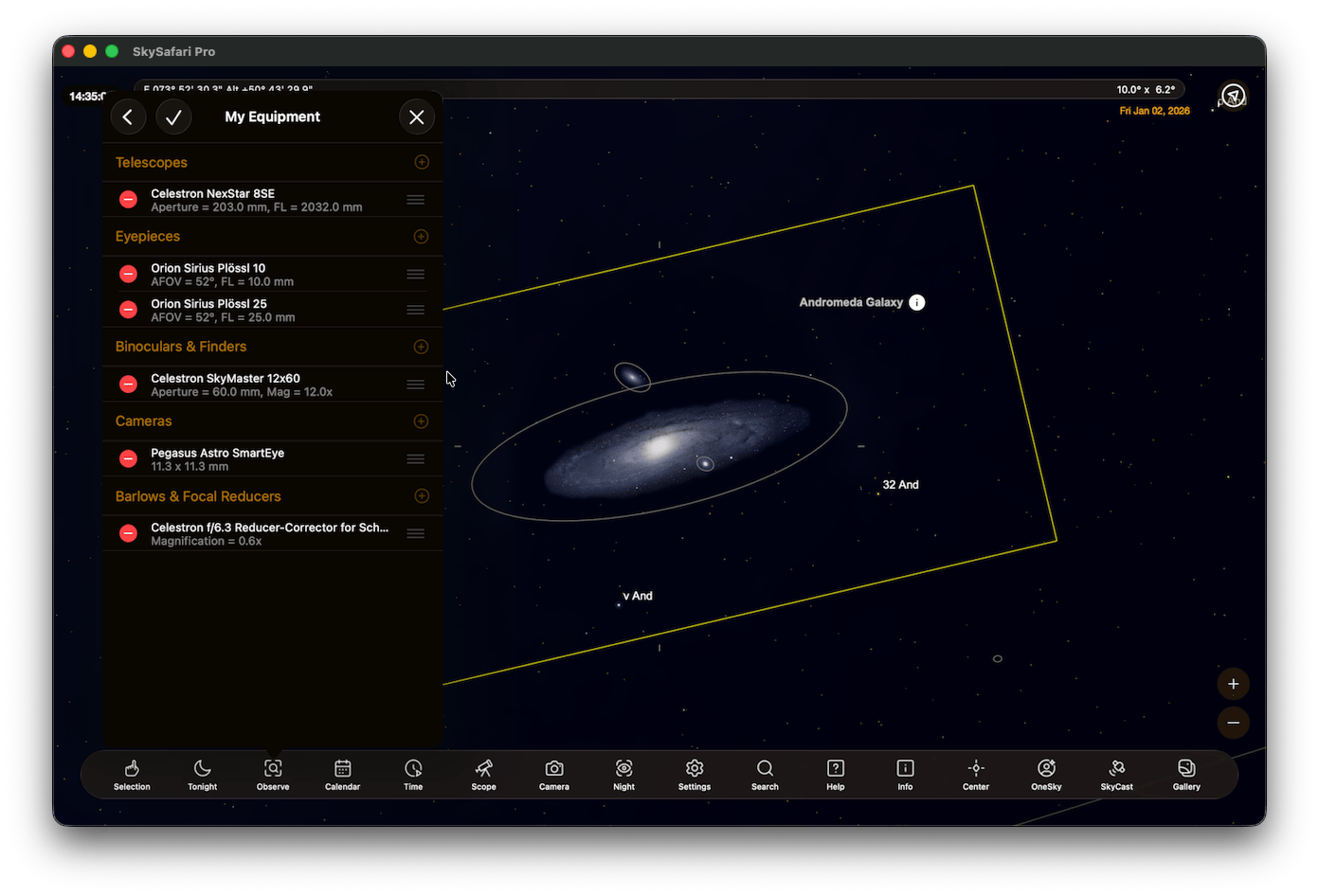
Equipment HelpUse the Equipment settings to enter information about your telescopes, eyepieces, finder scope, and/or camera(s). SkySafari uses this information to display the field of view of your equipment. And you can select this equipment when logging observations of objects.The My Equipment settings can be accessed by tapping the Observe button in the toolbar.SkySafari comes with an extensive built-in list of equipment. You can use these, and/or add your own equipment. To edit any equipment list, tap the Plus button to the right of the category name.
This section lists your telescopes. To add a new telescope, tap the Plus button to the right of the Telescope category name. Select equipment from the existing list or select to “Create Custom” and then enter the following:Model Name: descriptive name for the scope, for example “Celestron 8-in SCT f/10”.Manufacturer: name of the company that made the scope, for example “Celestron”.Aperture: diameter of the telescope’s primary mirror or lens, in mm. An 8-inch telescope has an aperture of 200 mm. This is usually printed on the telescope tube.Focal Length: focal length of the telescope’s primary mirror or lens, in mm. This may be printed on the telescope tube. It is the same as the aperture times the telescope’s f/ ratio. For example, an 8” telescope with an f/10 focal ratio has a focal length of 2000 mm (=200 mm x 10).When you’re done entering your telescope’s information, tap the Add To My Equipment button. To cancel without entering anything, tap the Telescopes back button to return to the Equipment list.
This section lists your eyepieces. To add a new eyepiece, tap the Plus button to the right of the Eyepieces category name. Select eyepieces from the existing list or select to “Create Custom Eyepiece” and then enter the following:Model Name: descriptive name for the eyepiece, for example “Celestron 25mm Plossl”.Manufacturer: name of the company that made the eyepiece, for example “Celestron”.Focal Length: focal length of the eyepiece, in mm. This is usually printed on the side of the eyepiece.Apparent Field of View: the angular width of the visible circle (in degrees) that you see looking through the eyepiece. Often found printed on the eyepiece barrel.
This section lists your binoculars and finder scopes. To add a new binocular or finder, tap the Plus button to the right of the Binoculars & Finders category name. Then select equipment from the existing list or select to “Create Custom” and then enter the following:Model Name: descriptive name for the binocular or finder. For example “Celestron 10x50”.Manufacturer: name of the company that made the binocular or finder, for example “Celestron”.Aperture: diameter of the objective lens, in mm. Binoculars and finders are commonly described as “Magnification x Aperture”. So for 10x50 binoculars, the aperture would be 50 mm.Magnification: the enlarging power of the binocular or finder. For 10 x 50 binoculars, the magnification would be 10x.True Field of View: the true angular width (in degrees) of the visible circle that you see looking through the finder scope or binoculars. For example, 10x finder scope with an apparent field of view of 60° would have a true field of view of 6°. May be printed on the actual equipment or found in its user manual.
This section lists your camera equipment. You can enter information for film cameras, CCDs, DSLR cameras, or any device with a rectangular image sensor - or more than one image sensor. For CCD cameras that have a separate guide sensor and main image sensor, enter the information for each sensor separately.Model Name: descriptive name for the camera. For example “SBIG ST-2000”.Make: name of the company that made the camera, for example “Canon”.Sensor Width: total width of the film frame or active image sensor area, in mm.Sensor Height: total height of the film frame or active image sensor area, in mm.Sensor X-offset: horizontal offset of the film or sensor center from the camera’s optical axis, in mm. This is usually zero, except for off-axis guide chips. Check your camera specs for details.Sensor Y-offset: vertical offset of the film or sensor center from the camera’s optical axis, in mm. Again, this is usually zero, except for off-axis guide chips. Check your camera specs for details.
This section lists your barlows and focal reducers. To add a barlow or focal reducer, tap the Add Barlow or Focal Reducer button below the list. Then select equipment from the existing list or select to “Create Custom Barlow or Focal Reducer” and then enter the following:Model Name: descriptive name for this piece of equipment. For example “2x Barlow”.Manufacturer: name of the company that made the barlow or focal reducer, for example “Celestron”.Magnification: the change in magnification that this barlow or focal reducer imparts. Enter a number greater than 1 for magnification or between 0 and 1 for reduction.
You can rearrange and delete items in an equipment list. Here’s how.On iOS, tap and hold the name of the equipment item to drag it to the new position. Swipe left on the equipment item name and a delete action is presented to you. Tap the Delete action.On Android, tap the Edit link at the top of the screen. Up/down arrows and a trash can appear at the bottom of the screen. Then tap the equipment item you want to move or delete. Use the up/down arrows to move the item in the list, or tap the trash can to delete it. When finished, tap the End Edit link at the top of the screen.