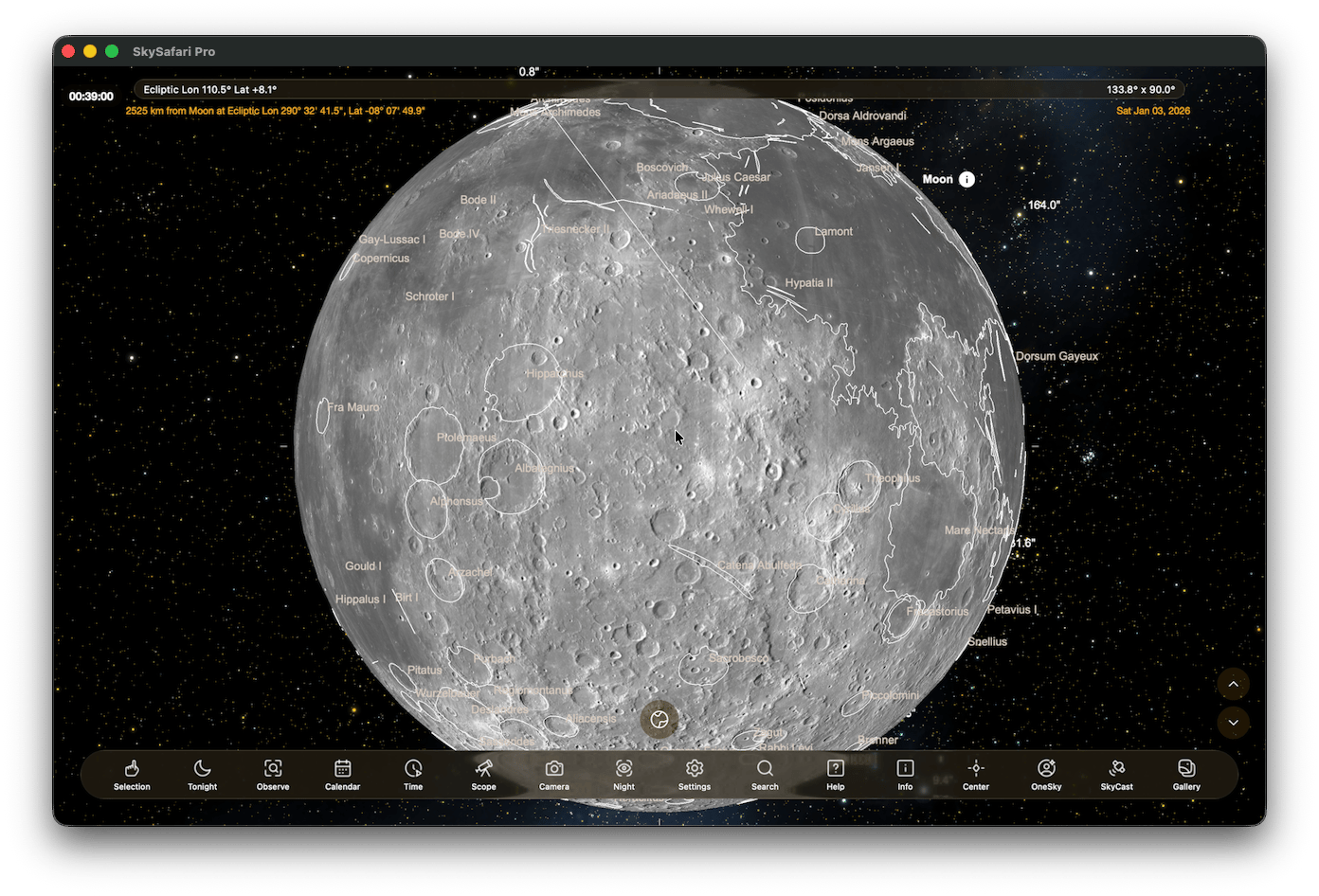
The Orbit button lets you leave Earth behind, and orbit the Sun, other Solar System objects, and even nearby stars. Please Note: this feature is only available in SkySafari Plus and Pro! In the basic version of SkySafari for iOS, you can unlock the Orbit feature with an in-app purchase.
Entering Orbit and Returning to Earth
To orbit a solar system object or another star, first select one by tapping on it in the sky chart, or by searching for one with the Search view. Then tap and hold your selected object to open the selection popup and select the Orbit button (looks like a rocket). Alternatively, you can open the Object Info view for an object and tap the Orbit button on the bottom left of the screen. In a few seconds, you’ll fly through millions of miles of space into orbit near the object you selected.If you select the Sun, you’ll fly to a location 100 Astronomical Units above the Sun, where you can see the entire solar system as a whole. From there, you can select any other solar system object and fly into orbit around it.When you want to go home to Earth, tap the small Earth icon at the bottom of the sky chart. SkySafari will fly you back to same Earthly location you left earlier.
Navigating in Orbit
When you’re orbiting a solar system object or nearby star, that object stays locked at the center of the sky chart. Swiping the chart moves you around the object. Two new buttons at the bottom right of the sky chart let you fly toward or away from the object you’re orbiting. The status bar above the sky chart indicates your distance from the object.You can magnify the field of view by pinching and zooming, just as you can when viewing from Earth. Zooming will not move you toward or away from the object you’re orbiting; it simply changes the sky chart’s field of view. A planet can appear very large in the sky chart because you’re far away from it but highly zoomed in, or because you’re zoomed out but very close to the planet. Usually the distinction is obvious, but this is one thing to note in case you become confused.While you’re orbiting another star or solar system object, you can center the sky chart on a different object by tapping it and selecting the Center Object button from the tap and hold selection menu, or by searching for it and tapping the “Center” button in the Object Info window. If you do this, swiping the chart will no longer move you around the object you’re orbiting; it will simply pan the field of view. To resume orbiting the object, tap it to select it again, then tap and hold the object to either Center or Orbit.
Using SkySafari in Orbit
When you’re orbiting another star or solar system object, certain SkySafari features are not available. For example, you cannot use the compass or gyroscope, and you cannot use any telescope control features. These features are only designed to work when you’re observing from the Earth’s surface!SkySafari also adjusts some display settings when you leave Earth and enter “orbit mode”. For example, planet and moon orbits are automatically displayed, and constellation lines are hidden. The maximum field of view width is restricted to 90 degrees. SkySafari does these things to provide a clearer display. When you return home to Earth, your previous display settings are restored.When you’re in orbit around another star or solar system object, the Object Info view provides all information about an object as it is seen from your perspective in orbit. For example, it gives the constellation in which the object appears, and the object’s visual magnitude and distance, as seen from your simulated location in space - not as seen from Earth.When you are orbiting another star, SkySafari only displays stars in the Hipparcos catalog, and nearby stars whose distances are well known. SkySafari does not display faint Tycho or Guide Star Catalog stars, because their positions in three-dimensional space are unknown. Therefore their apparent positions when seen from outside our Solar System cannot be accurately depicted.The Settings > Appearance & Behavior > Chart Animations switch controls the animation to and from stars or solar system objects that you wish to orbit. If turned off, you will jump instantly into orbit around objects when tapping Selection>Orbit Object instead of experiencing a few seconds of animated “flight”.
Was this page helpful?
{"docsConfig":{"theme":"mint","$schema":"https://mintlify.com/docs.json","name":"SkySafari Pro 8 Help","colors":{"primary":"#0F172A","light":"#1E293B","dark":"#0F172A"},"favicon":"/favicon.png","appearance":{"default":"dark"},"navbar":{"links":[{"label":"Support","href":"https://support.simulationcurriculum.com"}],"primary":{"type":"button","label":"Download","href":"https://apps.apple.com/app/skysafari-8-pro/id6752672420"}},"footer":{"socials":{"twitter":"https://twitter.com/SkySafariAstro","github":"https://github.com/simulation-curriculum/skysafari","website":"https://skysafariastronomy.com"}},"navigation":{"pages":[]}},"deployment":{"deploymentMetadataValue":{"subdomain":"simulationcurriculum","hasAudioNarration":false,"actualSubdomain":"simulationcurriculum","customDomains":["userguide.skysafariastronomy.com"],"gitSource":{"type":"github","owner":"quantum-k","repo":"skysafaripro-help-mintlify","deployBranch":"master","contentDirectory":"","isPrivate":true,"mountPath":"","label":""},"feedback":{"thumbs":true},"entitlements":{},"buildId":"6ae9444b4b6956dad9efceb3:success","clientVersion":"0.0.4342","searchFilterCounts":[{"language":"default","tag":"Documentation","count":74},{"language":"default","tag":"Basic Concepts","count":20},{"language":"default","tag":"App Specific","count":11},{"language":"default","tag":"Display Options","count":10},{"language":"default","tag":"Observe","count":8},{"language":"default","tag":"Selection","count":6},{"language":"default","tag":"Time \u0026 Coordinates","count":5},{"language":"default","tag":"Telescope Control","count":4},{"language":"default","tag":"Settings","count":3},{"language":"default","tag":"General Information","count":3}]},"assistantConfig":{"enableAskAiButton":false,"enableStarterQuestions":false,"enableAskAiSearchBar":true},"basePath":"","hasChatPermissions":false,"hasWebMcpPermissions":false,"toggles":[{"name":"kill-isr","enabled":true,"variant":{"name":"disabled","enabled":false,"feature_enabled":true},"impressionData":false},{"name":"custom-rbac-roles","enabled":true,"variant":{"name":"disabled","enabled":false,"feature_enabled":true},"impressionData":false},{"name":"agent-mintlify-slack","enabled":true,"variant":{"name":"disabled","enabled":false,"feature_enabled":true},"impressionData":false},{"name":"agent-integrations-settings","enabled":true,"variant":{"name":"disabled","enabled":false,"feature_enabled":true},"impressionData":false},{"name":"rbac-expansion","enabled":true,"variant":{"name":"disabled","enabled":false,"feature_enabled":true},"impressionData":false},{"name":"automations-pr-grouping","enabled":true,"variant":{"name":"disabled","enabled":false,"feature_enabled":true},"impressionData":false},{"name":"custom-prefix","enabled":true,"variant":{"name":"disabled","enabled":false,"feature_enabled":true},"impressionData":false},{"name":"analytics-v7","enabled":true,"variant":{"name":"disabled","enabled":false,"feature_enabled":true},"impressionData":false},{"name":"user-flows-analytics","enabled":true,"variant":{"name":"disabled","enabled":false,"feature_enabled":true},"impressionData":false},{"name":"no-publish-flow","enabled":true,"variant":{"name":"disabled","enabled":false,"feature_enabled":true},"impressionData":false},{"name":"snapshot-serving-live","enabled":true,"variant":{"name":"disabled","enabled":false,"feature_enabled":true},"impressionData":false},{"name":"stripTemperatureMiddleware","enabled":true,"variant":{"name":"disabled","enabled":false,"feature_enabled":true},"impressionData":false},{"name":"support-platform-pylon-zendesk","enabled":true,"variant":{"name":"disabled","enabled":false,"feature_enabled":true},"impressionData":false},{"name":"snapshot-serving","enabled":true,"variant":{"name":"disabled","enabled":false,"feature_enabled":true},"impressionData":false},{"name":"instant-rollback","enabled":true,"variant":{"name":"disabled","enabled":false,"feature_enabled":true},"impressionData":false},{"name":"granular-notifications-server","enabled":true,"variant":{"name":"disabled","enabled":false,"feature_enabled":true},"impressionData":false},{"name":"granular-notifications","enabled":true,"variant":{"name":"disabled","enabled":false,"feature_enabled":true},"impressionData":false},{"name":"automations-fable","enabled":true,"variant":{"name":"disabled","enabled":false,"feature_enabled":true},"impressionData":false},{"name":"fixed-ai-action-pricing","enabled":true,"variant":{"name":"disabled","enabled":false,"feature_enabled":true},"impressionData":false},{"name":"site-roles","enabled":true,"variant":{"name":"disabled","enabled":false,"feature_enabled":true},"impressionData":false},{"name":"automation-resolve-merge-conflict","enabled":true,"variant":{"name":"disabled","enabled":false,"feature_enabled":true},"impressionData":false},{"name":"scoped-publishing","enabled":true,"variant":{"name":"disabled","enabled":false,"feature_enabled":true},"impressionData":false},{"name":"mintql","enabled":true,"variant":{"name":"disabled","enabled":false,"feature_enabled":true},"impressionData":false},{"name":"page-level-analytics","enabled":true,"variant":{"name":"disabled","enabled":false,"feature_enabled":true},"impressionData":false},{"name":"editor-version-history-v2","enabled":true,"variant":{"name":"disabled","enabled":false,"feature_enabled":true},"impressionData":false},{"name":"billing-page-v2","enabled":true,"variant":{"name":"disabled","enabled":false,"feature_enabled":true},"impressionData":false},{"name":"full-page-search","enabled":true,"variant":{"name":"disabled","enabled":false,"feature_enabled":true},"impressionData":false},{"name":"workspace-projects","enabled":true,"variant":{"name":"disabled","enabled":false,"feature_enabled":true},"impressionData":false},{"name":"fork-pr-previews","enabled":true,"variant":{"name":"disabled","enabled":false,"feature_enabled":true},"impressionData":false},{"name":"revalidation-jwt","enabled":true,"variant":{"name":"disabled","enabled":false,"feature_enabled":true},"impressionData":false},{"name":"hobby-abuse-scan","enabled":true,"variant":{"name":"disabled","enabled":false,"feature_enabled":true},"impressionData":false},{"name":"dashboard-inbox","enabled":true,"variant":{"name":"disabled","enabled":false,"feature_enabled":true},"impressionData":false},{"name":"turbopuffer-dual-write","enabled":true,"variant":{"name":"disabled","enabled":false,"feature_enabled":true},"impressionData":false},{"name":"approve-review-flow","enabled":true,"variant":{"name":"disabled","enabled":false,"feature_enabled":true},"impressionData":false},{"name":"editor-metadata","enabled":true,"variant":{"name":"disabled","enabled":false,"feature_enabled":true},"impressionData":false},{"name":"turbopuffer-serve","enabled":true,"variant":{"name":"disabled","enabled":false,"feature_enabled":true},"impressionData":false},{"name":"live-agents","enabled":true,"variant":{"name":"disabled","enabled":false,"feature_enabled":true},"impressionData":false},{"name":"starter-pricing","enabled":true,"variant":{"name":"control","enabled":true,"payload":{"type":"string","value":"control"},"feature_enabled":true},"impressionData":false},{"name":"llms-txt-v2","enabled":true,"variant":{"name":"disabled","enabled":false,"feature_enabled":true},"impressionData":false},{"name":"wildcard-email-auth","enabled":true,"variant":{"name":"disabled","enabled":false,"feature_enabled":true},"impressionData":false}],"starterQuestions":[],"googleFontsInlined":false},"customCss":[]}
{"page":{"pagePath":"app-specific/selection-help/orbit-object-help","slug":"/app-specific/selection-help/orbit-object-help","pageMetadata":{"title":"Orbit Object Help","description":"Documentation for Orbit Object Help","href":"/app-specific/selection-help/orbit-object-help"},"description":{"compiledSource":"\"use strict\";\nconst {jsx: _jsx} = arguments[0];\nconst {useMDXComponents: _provideComponents} = arguments[0];\nfunction _createMdxContent(props) {\n const _components = {\n p: \"p\",\n ..._provideComponents(),\n ...props.components\n };\n return _jsx(_components.p, {\n children: \"Documentation for Orbit Object Help\"\n });\n}\nfunction MDXContent(props = {}) {\n const {wrapper: MDXLayout} = {\n ..._provideComponents(),\n ...props.components\n };\n return MDXLayout ? _jsx(MDXLayout, {\n ...props,\n children: _jsx(_createMdxContent, {\n ...props\n })\n }) : _createMdxContent(props);\n}\nreturn {\n default: MDXContent\n};\n","frontmatter":{},"scope":{}},"pageType":"default","mdx":{"mdxSource":{"compiledSource":"\"use strict\";const{Fragment:_Fragment,jsx:_jsx,jsxs:_jsxs}=arguments[0];const{useMDXComponents:_provideComponents}=arguments[0];function _createMdxContent(props){const _components={p:`p`,..._provideComponents(),...props.components},{Heading,OptimizedImage}=_components;if(!Heading)_missingMdxReference(`Heading`,true);if(!OptimizedImage)_missingMdxReference(`OptimizedImage`,true);return _jsxs(_Fragment,{children:[_jsx(OptimizedImage,{src:`https://mintcdn.com/simulationcurriculum/tIJH95xh2O6G6rAN/images/orbit-object.png?fit=max\u0026auto=format\u0026n=tIJH95xh2O6G6rAN\u0026q=85\u0026s=3a6dc2a40ed47da7c38d6ddf87314435`,alt:`Orbit`,\"data-og-width\":`1392`,width:`1392`,\"data-og-height\":`946`,height:`946`,\"data-path\":`images/orbit-object.png`,\"data-optimize\":`true`,\"data-opv\":`3`,srcset:`https://mintcdn.com/simulationcurriculum/tIJH95xh2O6G6rAN/images/orbit-object.png?w=280\u0026fit=max\u0026auto=format\u0026n=tIJH95xh2O6G6rAN\u0026q=85\u0026s=cdb3301c1900df79720aaee2af27c218 280w, https://mintcdn.com/simulationcurriculum/tIJH95xh2O6G6rAN/images/orbit-object.png?w=560\u0026fit=max\u0026auto=format\u0026n=tIJH95xh2O6G6rAN\u0026q=85\u0026s=50f630afa1744fa80d46f3e9895d3c10 560w, https://mintcdn.com/simulationcurriculum/tIJH95xh2O6G6rAN/images/orbit-object.png?w=840\u0026fit=max\u0026auto=format\u0026n=tIJH95xh2O6G6rAN\u0026q=85\u0026s=a92f5351aad9e0f6653cc28223099f94 840w, https://mintcdn.com/simulationcurriculum/tIJH95xh2O6G6rAN/images/orbit-object.png?w=1100\u0026fit=max\u0026auto=format\u0026n=tIJH95xh2O6G6rAN\u0026q=85\u0026s=0e873ea3ee62def20587a2803ae0c6dc 1100w, https://mintcdn.com/simulationcurriculum/tIJH95xh2O6G6rAN/images/orbit-object.png?w=1650\u0026fit=max\u0026auto=format\u0026n=tIJH95xh2O6G6rAN\u0026q=85\u0026s=796e5539de645964389c9b87376b0498 1650w, https://mintcdn.com/simulationcurriculum/tIJH95xh2O6G6rAN/images/orbit-object.png?w=2500\u0026fit=max\u0026auto=format\u0026n=tIJH95xh2O6G6rAN\u0026q=85\u0026s=788b048ed4c04cc41b16a792c385f8d2 2500w`}),`\n`,_jsx(Heading,{level:`2`,id:`orbit-help`,children:`Orbit Help`}),`\n`,_jsx(_components.p,{children:`The Orbit button lets you leave Earth behind, and orbit the Sun, other Solar System objects, and even nearby stars. Please Note: this feature is only available in SkySafari Plus and Pro! In the basic version of SkySafari for iOS, you can unlock the Orbit feature with an in-app purchase.`}),`\n`,_jsx(Heading,{level:`2`,id:`entering-orbit-and-returning-to-earth`,children:`Entering Orbit and Returning to Earth`}),`\n`,_jsx(_components.p,{children:`To orbit a solar system object or another star, first select one by tapping on it in the sky chart, or by searching for one with the Search view. Then tap and hold your selected object to open the selection popup and select the Orbit button (looks like a rocket). Alternatively, you can open the Object Info view for an object and tap the Orbit button on the bottom left of the screen. In a few seconds, you’ll fly through millions of miles of space into orbit near the object you selected.`}),`\n`,_jsx(_components.p,{children:`If you select the Sun, you’ll fly to a location 100 Astronomical Units above the Sun, where you can see the entire solar system as a whole. From there, you can select any other solar system object and fly into orbit around it.`}),`\n`,_jsx(_components.p,{children:`When you want to go home to Earth, tap the small Earth icon at the bottom of the sky chart. SkySafari will fly you back to same Earthly location you left earlier.`}),`\n`,_jsx(Heading,{level:`2`,id:`navigating-in-orbit`,children:`Navigating in Orbit`}),`\n`,_jsx(_components.p,{children:`When you’re orbiting a solar system object or nearby star, that object stays locked at the center of the sky chart. Swiping the chart moves you around the object. Two new buttons at the bottom right of the sky chart let you fly toward or away from the object you’re orbiting. The status bar above the sky chart indicates your distance from the object.`}),`\n`,_jsx(_components.p,{children:`You can magnify the field of view by pinching and zooming, just as you can when viewing from Earth. Zooming will not move you toward or away from the object you’re orbiting; it simply changes the sky chart’s field of view. A planet can appear very large in the sky chart because you’re far away from it but highly zoomed in, or because you’re zoomed out but very close to the planet. Usually the distinction is obvious, but this is one thing to note in case you become confused.`}),`\n`,_jsx(_components.p,{children:`While you’re orbiting another star or solar system object, you can center the sky chart on a different object by tapping it and selecting the Center Object button from the tap and hold selection menu, or by searching for it and tapping the “Center” button in the Object Info window. If you do this, swiping the chart will no longer move you around the object you’re orbiting; it will simply pan the field of view. To resume orbiting the object, tap it to select it again, then tap and hold the object to either Center or Orbit.`}),`\n`,_jsx(Heading,{level:`2`,id:`using-skysafari-in-orbit`,children:`Using SkySafari in Orbit`}),`\n`,_jsx(_components.p,{children:`When you’re orbiting another star or solar system object, certain SkySafari features are not available. For example, you cannot use the compass or gyroscope, and you cannot use any telescope control features. These features are only designed to work when you’re observing from the Earth’s surface!`}),`\n`,_jsx(_components.p,{children:`SkySafari also adjusts some display settings when you leave Earth and enter “orbit mode”. For example, planet and moon orbits are automatically displayed, and constellation lines are hidden. The maximum field of view width is restricted to 90 degrees. SkySafari does these things to provide a clearer display. When you return home to Earth, your previous display settings are restored.`}),`\n`,_jsx(_components.p,{children:`When you’re in orbit around another star or solar system object, the Object Info view provides all information about an object as it is seen from your perspective in orbit. For example, it gives the constellation in which the object appears, and the object’s visual magnitude and distance, as seen from your simulated location in space - not as seen from Earth.`}),`\n`,_jsx(_components.p,{children:`When you are orbiting another star, SkySafari only displays stars in the Hipparcos catalog, and nearby stars whose distances are well known. SkySafari does not display faint Tycho or Guide Star Catalog stars, because their positions in three-dimensional space are unknown. Therefore their apparent positions when seen from outside our Solar System cannot be accurately depicted.`}),`\n`,_jsx(_components.p,{children:`The Settings > Appearance \u0026 Behavior > Chart Animations switch controls the animation to and from stars or solar system objects that you wish to orbit. If turned off, you will jump instantly into orbit around objects when tapping Selection>Orbit Object instead of experiencing a few seconds of animated “flight”.`})]})}function MDXContent(props={}){const{wrapper:MDXLayout}={..._provideComponents(),...props.components};return MDXLayout?_jsx(MDXLayout,{...props,children:_jsx(_createMdxContent,{...props})}):_createMdxContent(props)}return{default:MDXContent};function _missingMdxReference(id,component){throw new Error(`Expected `+(component?`component`:`object`)+\" `\"+id+\"` to be defined: you likely forgot to import, pass, or provide it.\")}","frontmatter":{},"scope":{"config":{},"pageMetadata":{"title":"Orbit Object Help","description":"Documentation for Orbit Object Help","href":"/app-specific/selection-help/orbit-object-help"}}},"mdxSourceWithNoJs":null},"mdxExtracts":{"tableOfContents":[{"title":"Orbit Help","slug":"orbit-help","depth":2,"children":[]},{"title":"Entering Orbit and Returning to Earth","slug":"entering-orbit-and-returning-to-earth","depth":2,"children":[]},{"title":"Navigating in Orbit","slug":"navigating-in-orbit","depth":2,"children":[]},{"title":"Using SkySafari in Orbit","slug":"using-skysafari-in-orbit","depth":2,"children":[]}],"codeExamples":{}},"jsLinks":["/_mintlify/custom/simulationcurriculum/e7b4eaf0061ac345/mintlify/link-config.js","/_mintlify/custom/simulationcurriculum/572088fbb80e9db5/mintlify/zendesk-widget-loader.js"],"subdomain":"simulationcurriculum","siteName":"SkySafari Pro 8 Help","title":"Orbit Object Help - SkySafari Pro 8 Help","contextualStarterQuestions":[],"navMaps":{"firstHrefInVersion":{},"firstHrefInLanguage":{}},"lastModified":"2026-01-05T07:51:55.027Z","originalFileLocation":"app-specific/selection-help/orbit-object-help.mdx"},"headHtml":"\u003cscript data-mint-head>(function(){var d=document.documentElement,p=null;if(!p){try{p=localStorage.getItem(\"isDarkMode\")}catch(e){}if(p==='true')p='dark';else if(p==='false')p='light';if(p!=='light'\u0026\u0026p!=='dark'\u0026\u0026p!=='system')p=\"dark\"}var r=p==='system'?(matchMedia(\"(prefers-color-scheme: dark)\").matches?'dark':'light'):p;d.classList.remove(r==='dark'?'light':'dark');d.classList.add(r);d.setAttribute(\"data-theme-preference\",p)})();\u003c/script>\u003cmeta data-mint-head name=\"description\" content=\"Documentation for Orbit Object Help\">\u003cmeta data-mint-head name=\"application-name\" content=\"SkySafari Pro 8 Help\">\u003cmeta data-mint-head name=\"generator\" content=\"Mintlify\">\u003clink data-mint-head rel=\"icon\" type=\"image/png\" sizes=\"192x192\" href=\"/mintlify-assets/_mintlify/favicons/simulationcurriculum/-qhhl1kO1_8lb9RW/_generated/favicon/android-chrome-192x192.png\" media=\"(prefers-color-scheme: light)\">\u003clink data-mint-head rel=\"apple-touch-icon\" type=\"image/png\" sizes=\"180x180\" href=\"/mintlify-assets/_mintlify/favicons/simulationcurriculum/-qhhl1kO1_8lb9RW/_generated/favicon/apple-touch-icon.png\">\u003clink data-mint-head rel=\"icon\" type=\"image/png\" sizes=\"16x16\" href=\"/mintlify-assets/_mintlify/favicons/simulationcurriculum/-qhhl1kO1_8lb9RW/_generated/favicon/favicon-16x16.png\" media=\"(prefers-color-scheme: light)\">\u003clink data-mint-head rel=\"icon\" type=\"image/png\" sizes=\"32x32\" href=\"/mintlify-assets/_mintlify/favicons/simulationcurriculum/-qhhl1kO1_8lb9RW/_generated/favicon/favicon-32x32.png\" media=\"(prefers-color-scheme: light)\">\u003clink data-mint-head rel=\"shortcut icon\" type=\"image/x-icon\" href=\"/mintlify-assets/_mintlify/favicons/simulationcurriculum/-qhhl1kO1_8lb9RW/_generated/favicon/favicon.ico\" media=\"(prefers-color-scheme: light)\">\u003clink data-mint-head rel=\"icon\" type=\"image/png\" sizes=\"192x192\" href=\"/mintlify-assets/_mintlify/favicons/simulationcurriculum/-qhhl1kO1_8lb9RW/_generated/favicon-dark/android-chrome-192x192.png\" media=\"(prefers-color-scheme: dark)\">\u003clink data-mint-head rel=\"icon\" type=\"image/png\" sizes=\"16x16\" href=\"/mintlify-assets/_mintlify/favicons/simulationcurriculum/-qhhl1kO1_8lb9RW/_generated/favicon-dark/favicon-16x16.png\" media=\"(prefers-color-scheme: dark)\">\u003clink data-mint-head rel=\"icon\" type=\"image/png\" sizes=\"32x32\" href=\"/mintlify-assets/_mintlify/favicons/simulationcurriculum/-qhhl1kO1_8lb9RW/_generated/favicon-dark/favicon-32x32.png\" media=\"(prefers-color-scheme: dark)\">\u003clink data-mint-head rel=\"shortcut icon\" type=\"image/x-icon\" href=\"/mintlify-assets/_mintlify/favicons/simulationcurriculum/-qhhl1kO1_8lb9RW/_generated/favicon-dark/favicon.ico\" media=\"(prefers-color-scheme: dark)\">\u003cmeta data-mint-head property=\"og:title\" content=\"Orbit Object Help - SkySafari Pro 8 Help\">\u003cmeta data-mint-head property=\"og:description\" content=\"Documentation for Orbit Object Help\">\u003cmeta data-mint-head property=\"og:site_name\" content=\"SkySafari Pro 8 Help\">\u003cmeta data-mint-head property=\"og:url\" content=\"https://userguide.skysafariastronomy.com/app-specific/selection-help/orbit-object-help\">\u003cmeta data-mint-head property=\"og:type\" content=\"website\">\u003cmeta data-mint-head property=\"og:image\" content=\"https://simulationcurriculum.mintlify.site/_mintlify/api/og/v2?division=Selection\u0026amp;title=Orbit+Object+Help\u0026amp;description=Documentation+for+Orbit+Object+Help\u0026amp;theme=6ce1add74b06e4a3593d68a4\u0026amp;signature=2b62492484563a60a1f10e0a995b06d74e669c7d9bf37f35cd4de35d19c0bad0\">\u003cmeta data-mint-head property=\"og:image:width\" content=\"1200\">\u003cmeta data-mint-head property=\"og:image:height\" content=\"630\">\u003cmeta data-mint-head name=\"twitter:card\" content=\"summary_large_image\">\u003cmeta data-mint-head name=\"twitter:title\" content=\"Orbit Object Help - SkySafari Pro 8 Help\">\u003cmeta data-mint-head name=\"twitter:description\" content=\"Documentation for Orbit Object Help\">\u003cmeta data-mint-head name=\"twitter:image\" content=\"https://simulationcurriculum.mintlify.site/_mintlify/api/og/v2?division=Selection\u0026amp;title=Orbit+Object+Help\u0026amp;description=Documentation+for+Orbit+Object+Help\u0026amp;theme=6ce1add74b06e4a3593d68a4\u0026amp;signature=2b62492484563a60a1f10e0a995b06d74e669c7d9bf37f35cd4de35d19c0bad0\">\u003cmeta data-mint-head name=\"twitter:image:width\" content=\"1200\">\u003cmeta data-mint-head name=\"twitter:image:height\" content=\"630\">\u003cmeta data-mint-head name=\"msapplication-config\" content=\"/mintlify-assets/_mintlify/favicons/simulationcurriculum/-qhhl1kO1_8lb9RW/_generated/favicon/browserconfig.xml\">\u003cmeta data-mint-head name=\"apple-mobile-web-app-title\" content=\"SkySafari Pro 8 Help\">\u003cmeta data-mint-head name=\"msapplication-TileColor\" content=\"#0F172A\">\u003clink data-mint-head rel=\"canonical\" href=\"https://userguide.skysafariastronomy.com/app-specific/selection-help/orbit-object-help\">\u003clink data-mint-head rel=\"alternate\" type=\"application/xml\" href=\"/sitemap.xml\">\u003clink data-mint-head rel=\"alternate\" type=\"text/markdown\" href=\"/app-specific/selection-help/orbit-object-help.md\">\u003cscript data-mint-head type=\"application/ld+json\">{\"@context\":\"https://schema.org\",\"@graph\":[{\"@type\":\"Organization\",\"@id\":\"https://userguide.skysafariastronomy.com/#organization\",\"name\":\"SkySafari Pro 8 Help\",\"url\":\"https://userguide.skysafariastronomy.com\"},{\"@type\":\"WebSite\",\"@id\":\"https://userguide.skysafariastronomy.com#website\",\"name\":\"SkySafari Pro 8 Help\",\"url\":\"https://userguide.skysafariastronomy.com\",\"publisher\":{\"@id\":\"https://userguide.skysafariastronomy.com/#organization\"}},{\"@type\":\"WebPage\",\"@id\":\"https://userguide.skysafariastronomy.com/app-specific/selection-help/orbit-object-help#webpage\",\"url\":\"https://userguide.skysafariastronomy.com/app-specific/selection-help/orbit-object-help\",\"name\":\"Orbit Object Help\",\"description\":\"Documentation for Orbit Object Help\",\"dateModified\":\"2026-01-05T07:51:55.027Z\",\"isPartOf\":{\"@id\":\"https://userguide.skysafariastronomy.com#website\"},\"breadcrumb\":{\"@id\":\"https://userguide.skysafariastronomy.com/app-specific/selection-help/orbit-object-help#breadcrumb\"}},{\"@type\":\"BreadcrumbList\",\"@id\":\"https://userguide.skysafariastronomy.com/app-specific/selection-help/orbit-object-help#breadcrumb\",\"itemListElement\":[{\"@type\":\"ListItem\",\"position\":1,\"name\":\"Selection\",\"item\":\"https://userguide.skysafariastronomy.com/app-specific/selection-help/object-info-help\"},{\"@type\":\"ListItem\",\"position\":2,\"name\":\"Orbit Object Help\",\"item\":\"https://userguide.skysafariastronomy.com/app-specific/selection-help/orbit-object-help\"}]},{\"@type\":[\"Article\",\"TechArticle\"],\"@id\":\"https://userguide.skysafariastronomy.com/app-specific/selection-help/orbit-object-help#article\",\"headline\":\"Orbit Object Help\",\"name\":\"Orbit Object Help\",\"description\":\"Documentation for Orbit Object Help\",\"url\":\"https://userguide.skysafariastronomy.com/app-specific/selection-help/orbit-object-help\",\"mainEntityOfPage\":{\"@id\":\"https://userguide.skysafariastronomy.com/app-specific/selection-help/orbit-object-help#webpage\"},\"dateModified\":\"2026-01-05T07:51:55.027Z\",\"publisher\":{\"@id\":\"https://userguide.skysafariastronomy.com/#organization\"},\"isPartOf\":{\"@id\":\"https://userguide.skysafariastronomy.com#website\"}}]}\u003c/script>\u003cscript data-mint-head type=\"application/ld+json\">{\"@context\":\"https://schema.org\",\"@type\":\"WebSite\",\"name\":\"SkySafari Pro 8 Help\",\"publisher\":{\"@type\":\"Organization\",\"name\":\"SkySafari Pro 8 Help\"},\"provider\":{\"@type\":\"Organization\",\"name\":\"Mintlify\",\"url\":\"https://mintlify.com\"}}\u003c/script>","agentPointerHref":"/app-specific/selection-help/orbit-object-help.md","siteName":"SkySafari Pro 8 Help","nav":{"global":null,"anchors":[{"anchor":"Documentation","icon":"book-open","groups":[{"group":"Getting Started","pages":[{"title":"Main Menu","href":"/main-menu"},{"title":"Introduction","href":"/introduction"},{"title":"Quick Start","href":"/quick-start"}]},{"group":"General Information","pages":[{"title":"Links","href":"/general/links"},{"title":"Clear Sky Chart","href":"/general/clear-sky-chart"},{"title":"Data Migration Help","href":"/general/data-migration-help"}]},{"group":"App Specific","pages":[{"title":"Sky Chart Help (iOS)","href":"/app-specific/sky-chart-help-ios"},{"title":"Search Help","href":"/app-specific/search-help"},{"title":"Time Flow Help","href":"/app-specific/time-flow-help"},{"title":"Scope Control Help","href":"/app-specific/scope-control-help"},{"title":"Image Gallery Help","href":"/app-specific/image-gallery-help"},{"title":"Smarteye And Camera Configuration Help","href":"/app-specific/smarteye-and-camera-configuration-help"},{"title":"Tonight At A Glance Help","href":"/app-specific/tonight-at-a-glance-help"},{"title":"Compass And Ar Help","href":"/app-specific/compass-and-ar-help"},{"title":"Night Vision Help","href":"/app-specific/night-vision-help"},{"title":"Calendar Help","href":"/app-specific/calendar-help"},{"title":"Social Stargazing Help","href":"/app-specific/social-stargazing-help"}]},{"group":"Observe","pages":[{"title":"Events Help","href":"/app-specific/observe-help/events-help"},{"title":"Planner Help","href":"/app-specific/observe-help/planner-help"},{"title":"Observing Lists Help","href":"/app-specific/observe-help/observing-lists-help"},{"title":"Observations Help","href":"/app-specific/observe-help/observations-help"},{"title":"Observing Sessions Help","href":"/app-specific/observe-help/observing-sessions-help"},{"title":"Observing Sites Help","href":"/app-specific/observe-help/observing-sites-help"},{"title":"Scope Display Help","href":"/app-specific/observe-help/scope-display-help"},{"title":"Equipment Help","href":"/app-specific/observe-help/equipment-help"}]},{"group":"Selection","pages":[{"title":"Object Info Help","href":"/app-specific/selection-help/object-info-help"},{"title":"Center Object Help","href":"/app-specific/selection-help/center-object-help"},{"title":"Graph Object Help","description":"Documentation for Graph Object Help","href":"/app-specific/selection-help/graph-object-help"},{"title":"Orbit Object Help","href":"/app-specific/selection-help/orbit-object-help"},{"title":"Measure From Help","description":"Documentation for Measure From Help","href":"/app-specific/selection-help/measure-from-help"},{"title":"3D Galaxy View","href":"/app-specific/selection-help/3d-galaxy-view"}]},{"group":"Time \u0026 Coordinates","pages":[{"title":"Date And Time Help","href":"/app-specific/settings-help/time-and-coordinates-help/date-and-time-help"},{"title":"Location Help","href":"/app-specific/settings-help/time-and-coordinates-help/location-help"},{"title":"Coordinates Help","href":"/app-specific/settings-help/time-and-coordinates-help/coordinates-help"},{"title":"Precession Help","href":"/app-specific/settings-help/time-and-coordinates-help/precession-help"},{"title":"Formats Help","href":"/app-specific/settings-help/time-and-coordinates-help/formats-help"}]},{"group":"Display Options","pages":[{"title":"Appearance And Behavior Help","href":"/app-specific/settings-help/display-options-help/appearance-and-behavior-help"},{"title":"Notifications Help","href":"/app-specific/settings-help/display-options-help/notifications-help"},{"title":"Horizon And Sky Help","href":"/app-specific/settings-help/display-options-help/horizon-and-sky-help"},{"title":"Solar System Help","href":"/app-specific/settings-help/display-options-help/solar-system-help"},{"title":"Stars Help","href":"/app-specific/settings-help/display-options-help/stars-help"},{"title":"Deep Sky Help","href":"/app-specific/settings-help/display-options-help/deep-sky-help"},{"title":"Milky Way Help","href":"/app-specific/settings-help/display-options-help/milky-way-help"},{"title":"Constellations Help","href":"/app-specific/settings-help/display-options-help/constellations-help"},{"title":"Grids And Reference Help","href":"/app-specific/settings-help/display-options-help/grids-and-reference-help"},{"title":"H R Diagram Help","href":"/app-specific/settings-help/display-options-help/h-r-diagram-help"}]},{"group":"Telescope Control","pages":[{"title":"Scope Presets Help","href":"/app-specific/settings-help/telescope-control-help/scope-presets-help"},{"title":"Scope Settings Help","href":"/app-specific/settings-help/telescope-control-help/scope-settings-help"},{"title":"Celestron Wi Fi Help","href":"/app-specific/settings-help/telescope-control-help/celestron-wi-fi-help"},{"title":"StarSense Explorer","href":"/app-specific/settings-help/telescope-control-help/starsense-explorer-help"}]},{"group":"Settings","pages":[{"title":"Settings Help Menu","href":"/app-specific/settings-help/settings-help-menu"},{"title":"Settings Files Help","href":"/app-specific/settings-help/settings-files-help"},{"title":"Storage Help","href":"/app-specific/settings-help/storage-help"}]},{"group":"Account","pages":[{"title":"Livesky Help","href":"/app-specific/settings-help/account-help/livesky-help"}]},{"group":"Basic Concepts","pages":[{"title":"Basic Concepts Menu","href":"/general/basic-concepts/basic-concepts-menu"},{"title":"Astronomical Coordinates","href":"/general/basic-concepts/astronomical-coordinates"},{"title":"Date And Time","href":"/general/basic-concepts/date-and-time"},{"title":"Deep Sky Objects","href":"/general/basic-concepts/deep-sky-objects"},{"title":"Double Multiple And Binary Stars","href":"/general/basic-concepts/double-multiple-and-binary-stars"},{"title":"Galaxies","href":"/general/basic-concepts/galaxies"},{"title":"How Stars Die","href":"/general/basic-concepts/how-stars-die"},{"title":"Motion Of The Planets","href":"/general/basic-concepts/motion-of-the-planets"},{"title":"Nebulae","href":"/general/basic-concepts/nebulae"},{"title":"Orbital Mechanics","href":"/general/basic-concepts/orbital-mechanics"},{"title":"Phases And Tides Of The Moon","href":"/general/basic-concepts/phases-and-tides-of-the-moon"},{"title":"Precession Of The Equinoxes","href":"/general/basic-concepts/precession-of-the-equinoxes"},{"title":"Properties Of The Stars","href":"/general/basic-concepts/properties-of-the-stars"},{"title":"Solar And Lunar Eclipses","href":"/general/basic-concepts/solar-and-lunar-eclipses"},{"title":"Star Clusters","href":"/general/basic-concepts/star-clusters"},{"title":"Star Formation And Evolution","href":"/general/basic-concepts/star-formation-and-evolution"},{"title":"Star Names And Catalogs","href":"/general/basic-concepts/star-names-and-catalogs"},{"title":"The Milky Way","href":"/general/basic-concepts/the-milky-way"},{"title":"The Seasons","href":"/general/basic-concepts/the-seasons"},{"title":"Variable Stars Novae And Supernovae","href":"/general/basic-concepts/variable-stars-novae-and-supernovae"}]}]}]},"basePath":"","title":"Orbit Object Help - SkySafari Pro 8 Help","deploymentId":"dpl_QQ3G2kinQNQFFK6Sh8dmX2teK74w","buildId":"dpl_QQ3G2kinQNQFFK6Sh8dmX2teK74w","dynamics":["a74be98ba7"],"chunks":["zoom-image-lightbox-lceUjs6n.js","lightbox-handle-r17bVUz3.js"]}