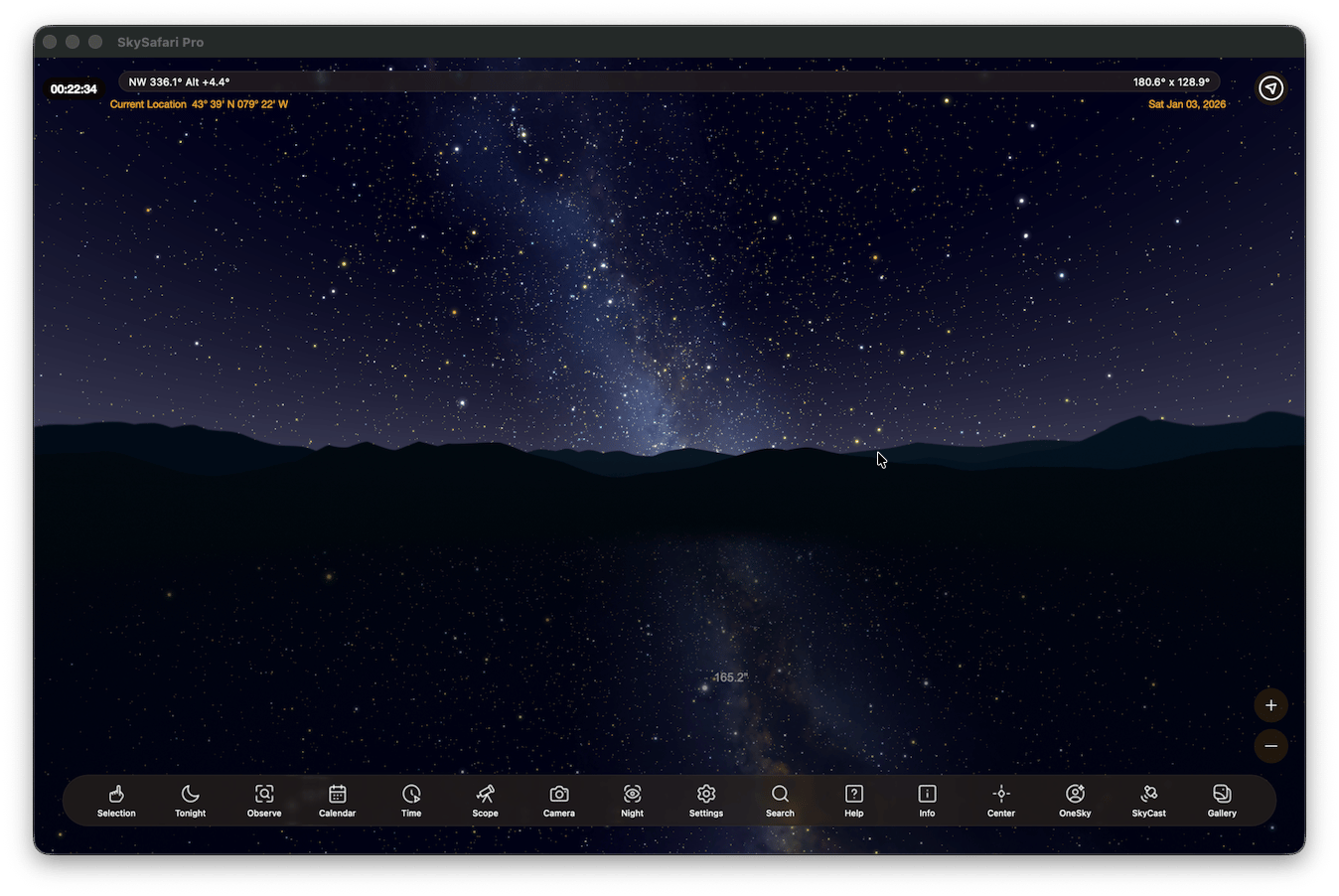
The settings in this view let you control the display of the local horizon, and the sky background. In SkySafari Plus and Pro, note that the horizon is not visible if you are not displaying the sky chart using horizon coordinates! Use horizon coordinates to show the horizon.
Horizon Display
Show Horizon & Sky: Turns the local horizon and sky background display off or on. When turned off, most of the other settings in this section are disabled.as Transparent with Line: With a transparent horizon, objects below the horizon are visible, as if the Earth were transparent. The horizon line itself is still visible.as Translucent Area: With a translucent horizon, objects below the horizon are visible, but so is the Earth.as Opaque Area: With an opaque horizon, no objects are visible below the horizon.as Panoramic Image: With a horizon panorama, the horizon is drawn as a realistic image that moves as you pan and zoom around the chart. You can select a specific panorama from the list in the section below.Show Cardinal Points: Sets whether the cardinal points are displayed along the horizon line. Cardinal points label the north, east, south, and west directions on the horizon.Show Daylight: When turned on, the sky color changes with the cycle of day and night. When turned off, the sky background color is always black.Show Horizon Glow: When turned on, the horizon is drawn with a soft glow that increases with daylight to simulate atmospheric haze. When turned off, the horizon is always drawn against a clear sky background.Horizon Altitude: Lets you determine when objects rise and set above a specific altitude. Selecting this item leads to a slider that lets you set the horizon altitude used to compute rise/set times, and to draw the horizon line.Objects below the altitude you select will be considered below the horizon. You can use this to quickly identify objects which - even though technically above zero degrees altitude - are still too low in the sky to be easily observed. It’s usually not worthwhile to observe objects below an altitude of 10 - 15 degrees, since they are lost in atmospheric haze.Please note: this feature is only available in SkySafari Plus and Pro.
Horizon Panoramas
This section lists the horizon panoramas that are available in SkySafari. The currently-selected panorama is shown with a check mark. The panorama is only displayed if you’ve selected Panoramic Image display option above. Choosing any item from the list of horizon panoramas will automatically select this option!
Creating Your Own Horizon Panorama
You can create your own horizon panorama - for instance, an image of your own back yard, or your favorite observing site. You can then import it into SkySafari, to show the sky as it realistically appears from your location.To do this, first create a panorama using your digital camera, and a panorama-stitching program like Adobe Photoshop, Canon PhotoStitch, or DoubleTake for Mac OS X. Resize your panorama image to dimensions of exactly 2048 pixels wide x 1024 pixels tall.The vertical sweep of the image represents 180 degrees of altitude, from the zenith at +90° (top of the image), to the horizon at 0° (middle of the image) to the nadir at -90° (bottom).The horizontal direction on your image represents 360° of azimuth, starting with north (0°) at the left edge, east (90°) one quarter of the way across, south (180°) halfway across, west (270°) three fourths of the way across, and finally wrapping around again to north (360° or 0°) at the right edge.When you’re done photoshopping, save your panorama as a 32-bit (8 bits per channel) RGBA color image file in PNG format. Make sure your image contains an alpha or transparency layer that accurately indicates the parts of your panorama that are opaque (the ground, trees, buildings, etc.) versus the parts that are transparent (the sky).
Importing Your Horizon with the Files App
If you are using SkySafari on an iPhone, iPad, or iPod touch, you can import your horizon panorama using the Files app. To do this, open the Files app and navigate to the SkySafari folder located under the “On my iPhone/iPad” category. Now add your horizon PNG image file. Close and reopen SkySafari.If everything works correctly, your image will then appear in the list of horizon panoramas in SkySafari. You can select and display it just like SkySafari’s other built-in horizon panoramas.If your horizon panorama doesn’t appear in SkySafari’s list, make sure it’s in PNG format, and that its name ends with “.png”. Make sure its dimensions are 2048 x 1024, and that it is a 32-bit (8 bit per channel) RGBA color image with an alpha (transparency) layer. If all else fails, you can email your image to Simulation Curriculum’s technical support, and we can try to debug it for you.
Importing Your Horizon with SD Card
If you are using SkySafari for Android, you can import your horizon panorama using your SD card. To do this, connect your Android device with a USB cable to a computer. Then mount your Android’s SD card on your computer, so it appears as a disk. Look for a SkySafari, SkySafari Plus, or SkySafari Pro folder on the root (top level) of your SD card, depending on which version of SkySafari you own. Then copy your horizon PNG image file into the Horizon Panoramas folder within this folder.For example, if you own SkySafari Pro, copy your panorama to the following directory on your SD card:
<top level of SD card>/SkySafari Pro/Panoramas/
If everything works correctly, your image will then appear in the list of horizon panoramas in SkySafari. You can select and display it just like SkySafari’s other built-in horizon panoramas.If your horizon panorama doesn’t appear in SkySafari’s list, make sure it’s in PNG format, and that its name ends with “.png”. Make sure its dimensions are 2048 x 1024, and that’s a 32-bit RGBA color image with an alpha (transparency) layer. If all else fails, you can email your image to Simulation Curriculum technical support, and we can try to debug it for you.
Was this page helpful?
{"docsConfig":{"theme":"mint","$schema":"https://mintlify.com/docs.json","name":"SkySafari Pro 8 Help","colors":{"primary":"#0F172A","light":"#1E293B","dark":"#0F172A"},"favicon":"/favicon.png","appearance":{"default":"dark"},"navbar":{"links":[{"label":"Support","href":"https://support.simulationcurriculum.com"}],"primary":{"type":"button","label":"Download","href":"https://apps.apple.com/app/skysafari-8-pro/id6752672420"}},"footer":{"socials":{"twitter":"https://twitter.com/SkySafariAstro","github":"https://github.com/simulation-curriculum/skysafari","website":"https://skysafariastronomy.com"}},"navigation":{"pages":[]}},"deployment":{"deploymentMetadataValue":{"subdomain":"simulationcurriculum","hasAudioNarration":false,"actualSubdomain":"simulationcurriculum","customDomains":["userguide.skysafariastronomy.com"],"gitSource":{"type":"github","owner":"quantum-k","repo":"skysafaripro-help-mintlify","deployBranch":"master","contentDirectory":"","isPrivate":true,"mountPath":"","label":""},"feedback":{"thumbs":true},"entitlements":{},"buildId":"6ae9444b4b6956dad9efceb3:success","clientVersion":"0.0.4342","searchFilterCounts":[{"language":"default","tag":"Documentation","count":74},{"language":"default","tag":"Basic Concepts","count":20},{"language":"default","tag":"App Specific","count":11},{"language":"default","tag":"Display Options","count":10},{"language":"default","tag":"Observe","count":8},{"language":"default","tag":"Selection","count":6},{"language":"default","tag":"Time \u0026 Coordinates","count":5},{"language":"default","tag":"Telescope Control","count":4},{"language":"default","tag":"Settings","count":3},{"language":"default","tag":"General Information","count":3}]},"assistantConfig":{"enableAskAiButton":false,"enableStarterQuestions":false,"enableAskAiSearchBar":true},"basePath":"","hasChatPermissions":false,"hasWebMcpPermissions":false,"toggles":[{"name":"kill-isr","enabled":true,"variant":{"name":"disabled","enabled":false,"feature_enabled":true},"impressionData":false},{"name":"custom-rbac-roles","enabled":true,"variant":{"name":"disabled","enabled":false,"feature_enabled":true},"impressionData":false},{"name":"agent-mintlify-slack","enabled":true,"variant":{"name":"disabled","enabled":false,"feature_enabled":true},"impressionData":false},{"name":"agent-integrations-settings","enabled":true,"variant":{"name":"disabled","enabled":false,"feature_enabled":true},"impressionData":false},{"name":"rbac-expansion","enabled":true,"variant":{"name":"disabled","enabled":false,"feature_enabled":true},"impressionData":false},{"name":"automations-pr-grouping","enabled":true,"variant":{"name":"disabled","enabled":false,"feature_enabled":true},"impressionData":false},{"name":"custom-prefix","enabled":true,"variant":{"name":"disabled","enabled":false,"feature_enabled":true},"impressionData":false},{"name":"analytics-v7","enabled":true,"variant":{"name":"disabled","enabled":false,"feature_enabled":true},"impressionData":false},{"name":"user-flows-analytics","enabled":true,"variant":{"name":"disabled","enabled":false,"feature_enabled":true},"impressionData":false},{"name":"no-publish-flow","enabled":true,"variant":{"name":"disabled","enabled":false,"feature_enabled":true},"impressionData":false},{"name":"snapshot-serving-live","enabled":true,"variant":{"name":"disabled","enabled":false,"feature_enabled":true},"impressionData":false},{"name":"stripTemperatureMiddleware","enabled":true,"variant":{"name":"disabled","enabled":false,"feature_enabled":true},"impressionData":false},{"name":"support-platform-pylon-zendesk","enabled":true,"variant":{"name":"disabled","enabled":false,"feature_enabled":true},"impressionData":false},{"name":"snapshot-serving","enabled":true,"variant":{"name":"disabled","enabled":false,"feature_enabled":true},"impressionData":false},{"name":"instant-rollback","enabled":true,"variant":{"name":"disabled","enabled":false,"feature_enabled":true},"impressionData":false},{"name":"granular-notifications-server","enabled":true,"variant":{"name":"disabled","enabled":false,"feature_enabled":true},"impressionData":false},{"name":"granular-notifications","enabled":true,"variant":{"name":"disabled","enabled":false,"feature_enabled":true},"impressionData":false},{"name":"automations-fable","enabled":true,"variant":{"name":"disabled","enabled":false,"feature_enabled":true},"impressionData":false},{"name":"fixed-ai-action-pricing","enabled":true,"variant":{"name":"disabled","enabled":false,"feature_enabled":true},"impressionData":false},{"name":"site-roles","enabled":true,"variant":{"name":"disabled","enabled":false,"feature_enabled":true},"impressionData":false},{"name":"automation-resolve-merge-conflict","enabled":true,"variant":{"name":"disabled","enabled":false,"feature_enabled":true},"impressionData":false},{"name":"scoped-publishing","enabled":true,"variant":{"name":"disabled","enabled":false,"feature_enabled":true},"impressionData":false},{"name":"mintql","enabled":true,"variant":{"name":"disabled","enabled":false,"feature_enabled":true},"impressionData":false},{"name":"page-level-analytics","enabled":true,"variant":{"name":"disabled","enabled":false,"feature_enabled":true},"impressionData":false},{"name":"editor-version-history-v2","enabled":true,"variant":{"name":"disabled","enabled":false,"feature_enabled":true},"impressionData":false},{"name":"billing-page-v2","enabled":true,"variant":{"name":"disabled","enabled":false,"feature_enabled":true},"impressionData":false},{"name":"full-page-search","enabled":true,"variant":{"name":"disabled","enabled":false,"feature_enabled":true},"impressionData":false},{"name":"workspace-projects","enabled":true,"variant":{"name":"disabled","enabled":false,"feature_enabled":true},"impressionData":false},{"name":"fork-pr-previews","enabled":true,"variant":{"name":"disabled","enabled":false,"feature_enabled":true},"impressionData":false},{"name":"revalidation-jwt","enabled":true,"variant":{"name":"disabled","enabled":false,"feature_enabled":true},"impressionData":false},{"name":"hobby-abuse-scan","enabled":true,"variant":{"name":"disabled","enabled":false,"feature_enabled":true},"impressionData":false},{"name":"dashboard-inbox","enabled":true,"variant":{"name":"disabled","enabled":false,"feature_enabled":true},"impressionData":false},{"name":"turbopuffer-dual-write","enabled":true,"variant":{"name":"disabled","enabled":false,"feature_enabled":true},"impressionData":false},{"name":"approve-review-flow","enabled":true,"variant":{"name":"disabled","enabled":false,"feature_enabled":true},"impressionData":false},{"name":"editor-metadata","enabled":true,"variant":{"name":"disabled","enabled":false,"feature_enabled":true},"impressionData":false},{"name":"turbopuffer-serve","enabled":true,"variant":{"name":"disabled","enabled":false,"feature_enabled":true},"impressionData":false},{"name":"live-agents","enabled":true,"variant":{"name":"disabled","enabled":false,"feature_enabled":true},"impressionData":false},{"name":"starter-pricing","enabled":true,"variant":{"name":"treatment","enabled":true,"payload":{"type":"string","value":"treatment"},"feature_enabled":true},"impressionData":false},{"name":"llms-txt-v2","enabled":true,"variant":{"name":"disabled","enabled":false,"feature_enabled":true},"impressionData":false},{"name":"wildcard-email-auth","enabled":true,"variant":{"name":"disabled","enabled":false,"feature_enabled":true},"impressionData":false}],"starterQuestions":[],"googleFontsInlined":false},"customCss":[]}
{"page":{"pagePath":"app-specific/settings-help/display-options-help/horizon-and-sky-help","slug":"/app-specific/settings-help/display-options-help/horizon-and-sky-help","pageMetadata":{"title":"Horizon And Sky Help","description":"Documentation for Horizon And Sky Help","href":"/app-specific/settings-help/display-options-help/horizon-and-sky-help"},"description":{"compiledSource":"\"use strict\";\nconst {jsx: _jsx} = arguments[0];\nconst {useMDXComponents: _provideComponents} = arguments[0];\nfunction _createMdxContent(props) {\n const _components = {\n p: \"p\",\n ..._provideComponents(),\n ...props.components\n };\n return _jsx(_components.p, {\n children: \"Documentation for Horizon And Sky Help\"\n });\n}\nfunction MDXContent(props = {}) {\n const {wrapper: MDXLayout} = {\n ..._provideComponents(),\n ...props.components\n };\n return MDXLayout ? _jsx(MDXLayout, {\n ...props,\n children: _jsx(_createMdxContent, {\n ...props\n })\n }) : _createMdxContent(props);\n}\nreturn {\n default: MDXContent\n};\n","frontmatter":{},"scope":{}},"pageType":"default","mdx":{"mdxSource":{"compiledSource":"\"use strict\";const{Fragment:_Fragment,jsx:_jsx,jsxs:_jsxs}=arguments[0];const{useMDXComponents:_provideComponents}=arguments[0];function _createMdxContent(props){const _components={p:`p`,..._provideComponents(),...props.components},{Heading,OptimizedImage}=_components;if(!Heading)_missingMdxReference(`Heading`,true);if(!OptimizedImage)_missingMdxReference(`OptimizedImage`,true);return _jsxs(_Fragment,{children:[_jsx(OptimizedImage,{src:`https://mintcdn.com/simulationcurriculum/tIJH95xh2O6G6rAN/images/horizon.png?fit=max\u0026auto=format\u0026n=tIJH95xh2O6G6rAN\u0026q=85\u0026s=ccc4149e83d08d1bb86b8bdaf306f2e6`,alt:`Horizon`,\"data-og-width\":`1348`,width:`1348`,\"data-og-height\":`902`,height:`902`,\"data-path\":`images/horizon.png`,\"data-optimize\":`true`,\"data-opv\":`3`,srcset:`https://mintcdn.com/simulationcurriculum/tIJH95xh2O6G6rAN/images/horizon.png?w=280\u0026fit=max\u0026auto=format\u0026n=tIJH95xh2O6G6rAN\u0026q=85\u0026s=1bbc2601697beae3468033063b4e57d4 280w, https://mintcdn.com/simulationcurriculum/tIJH95xh2O6G6rAN/images/horizon.png?w=560\u0026fit=max\u0026auto=format\u0026n=tIJH95xh2O6G6rAN\u0026q=85\u0026s=c0313e11db72f8b5e30cce9dcf5949bd 560w, https://mintcdn.com/simulationcurriculum/tIJH95xh2O6G6rAN/images/horizon.png?w=840\u0026fit=max\u0026auto=format\u0026n=tIJH95xh2O6G6rAN\u0026q=85\u0026s=5e8cdb32b36829b347b764979c53e9a5 840w, https://mintcdn.com/simulationcurriculum/tIJH95xh2O6G6rAN/images/horizon.png?w=1100\u0026fit=max\u0026auto=format\u0026n=tIJH95xh2O6G6rAN\u0026q=85\u0026s=accc5a910c672279fd16fe569ebcb9fb 1100w, https://mintcdn.com/simulationcurriculum/tIJH95xh2O6G6rAN/images/horizon.png?w=1650\u0026fit=max\u0026auto=format\u0026n=tIJH95xh2O6G6rAN\u0026q=85\u0026s=96d7bdfaade1b6d1f41347f01513422e 1650w, https://mintcdn.com/simulationcurriculum/tIJH95xh2O6G6rAN/images/horizon.png?w=2500\u0026fit=max\u0026auto=format\u0026n=tIJH95xh2O6G6rAN\u0026q=85\u0026s=2de9a835b63e47b46faff31bb20b5959 2500w`}),`\n`,_jsx(Heading,{level:`2`,id:`horizon-\u0026-sky-help`,children:`Horizon \u0026 Sky Help`}),`\n`,_jsx(_components.p,{children:`The settings in this view let you control the display of the local horizon, and the sky background. In SkySafari Plus and Pro, note that the horizon is not visible if you are not displaying the sky chart using horizon coordinates! Use horizon coordinates to show the horizon.`}),`\n`,_jsx(Heading,{level:`2`,id:`horizon-display`,children:`Horizon Display`}),`\n`,_jsx(_components.p,{children:`Show Horizon \u0026 Sky: Turns the local horizon and sky background display off or on. When turned off, most of the other settings in this section are disabled.`}),`\n`,_jsx(_components.p,{children:`as Transparent with Line: With a transparent horizon, objects below the horizon are visible, as if the Earth were transparent. The horizon line itself is still visible.`}),`\n`,_jsx(_components.p,{children:`as Translucent Area: With a translucent horizon, objects below the horizon are visible, but so is the Earth.`}),`\n`,_jsx(_components.p,{children:`as Opaque Area: With an opaque horizon, no objects are visible below the horizon.`}),`\n`,_jsx(_components.p,{children:`as Panoramic Image: With a horizon panorama, the horizon is drawn as a realistic image that moves as you pan and zoom around the chart. You can select a specific panorama from the list in the section below.`}),`\n`,_jsx(_components.p,{children:`Show Cardinal Points: Sets whether the cardinal points are displayed along the horizon line. Cardinal points label the north, east, south, and west directions on the horizon.`}),`\n`,_jsx(_components.p,{children:`Show Daylight: When turned on, the sky color changes with the cycle of day and night. When turned off, the sky background color is always black.`}),`\n`,_jsx(_components.p,{children:`Show Horizon Glow: When turned on, the horizon is drawn with a soft glow that increases with daylight to simulate atmospheric haze. When turned off, the horizon is always drawn against a clear sky background.`}),`\n`,_jsx(_components.p,{children:`Horizon Altitude: Lets you determine when objects rise and set above a specific altitude. Selecting this item leads to a slider that lets you set the horizon altitude used to compute rise/set times, and to draw the horizon line.`}),`\n`,_jsx(_components.p,{children:`Objects below the altitude you select will be considered below the horizon. You can use this to quickly identify objects which - even though technically above zero degrees altitude - are still too low in the sky to be easily observed. It’s usually not worthwhile to observe objects below an altitude of 10 - 15 degrees, since they are lost in atmospheric haze.`}),`\n`,_jsx(_components.p,{children:`Please note: this feature is only available in SkySafari Plus and Pro.`}),`\n`,_jsx(Heading,{level:`2`,id:`horizon-panoramas`,children:`Horizon Panoramas`}),`\n`,_jsx(_components.p,{children:`This section lists the horizon panoramas that are available in SkySafari. The currently-selected panorama is shown with a check mark. The panorama is only displayed if you’ve selected Panoramic Image display option above. Choosing any item from the list of horizon panoramas will automatically select this option!`}),`\n`,_jsx(Heading,{level:`2`,id:`creating-your-own-horizon-panorama`,children:`Creating Your Own Horizon Panorama`}),`\n`,_jsx(_components.p,{children:`You can create your own horizon panorama - for instance, an image of your own back yard, or your favorite observing site. You can then import it into SkySafari, to show the sky as it realistically appears from your location.`}),`\n`,_jsx(_components.p,{children:`To do this, first create a panorama using your digital camera, and a panorama-stitching program like Adobe Photoshop, Canon PhotoStitch, or DoubleTake for Mac OS X. Resize your panorama image to dimensions of exactly 2048 pixels wide x 1024 pixels tall.`}),`\n`,_jsx(_components.p,{children:`The vertical sweep of the image represents 180 degrees of altitude, from the zenith at +90° (top of the image), to the horizon at 0° (middle of the image) to the nadir at -90° (bottom).`}),`\n`,_jsx(_components.p,{children:`The horizontal direction on your image represents 360° of azimuth, starting with north (0°) at the left edge, east (90°) one quarter of the way across, south (180°) halfway across, west (270°) three fourths of the way across, and finally wrapping around again to north (360° or 0°) at the right edge.`}),`\n`,_jsx(_components.p,{children:`When you’re done photoshopping, save your panorama as a 32-bit (8 bits per channel) RGBA color image file in PNG format. Make sure your image contains an alpha or transparency layer that accurately indicates the parts of your panorama that are opaque (the ground, trees, buildings, etc.) versus the parts that are transparent (the sky).`}),`\n`,_jsx(Heading,{level:`2`,id:`importing-your-horizon-with-the-files-app`,children:`Importing Your Horizon with the Files App`}),`\n`,_jsx(_components.p,{children:`If you are using SkySafari on an iPhone, iPad, or iPod touch, you can import your horizon panorama using the Files app. To do this, open the Files app and navigate to the SkySafari folder located under the “On my iPhone/iPad” category. Now add your horizon PNG image file. Close and reopen SkySafari.`}),`\n`,_jsx(_components.p,{children:`If everything works correctly, your image will then appear in the list of horizon panoramas in SkySafari. You can select and display it just like SkySafari’s other built-in horizon panoramas.`}),`\n`,_jsx(_components.p,{children:`If your horizon panorama doesn’t appear in SkySafari’s list, make sure it’s in PNG format, and that its name ends with “.png”. Make sure its dimensions are 2048 x 1024, and that it is a 32-bit (8 bit per channel) RGBA color image with an alpha (transparency) layer. If all else fails, you can email your image to Simulation Curriculum’s technical support, and we can try to debug it for you.`}),`\n`,_jsx(Heading,{level:`2`,id:`importing-your-horizon-with-sd-card`,children:`Importing Your Horizon with SD Card`}),`\n`,_jsx(_components.p,{children:`If you are using SkySafari for Android, you can import your horizon panorama using your SD card. To do this, connect your Android device with a USB cable to a computer. Then mount your Android’s SD card on your computer, so it appears as a disk. Look for a SkySafari, SkySafari Plus, or SkySafari Pro folder on the root (top level) of your SD card, depending on which version of SkySafari you own. Then copy your horizon PNG image file into the Horizon Panoramas folder within this folder.`}),`\n`,_jsx(_components.p,{children:`For example, if you own SkySafari Pro, copy your panorama to the following directory on your SD card:`}),`\n`,_jsx(Heading,{level:`2`,id:`\u003ctop-level-of-sd-card>/skysafari-pro/panoramas/`,children:`\u003ctop level of SD card>/SkySafari Pro/Panoramas/`}),`\n`,_jsx(_components.p,{children:`If everything works correctly, your image will then appear in the list of horizon panoramas in SkySafari. You can select and display it just like SkySafari’s other built-in horizon panoramas.`}),`\n`,_jsx(_components.p,{children:`If your horizon panorama doesn’t appear in SkySafari’s list, make sure it’s in PNG format, and that its name ends with “.png”. Make sure its dimensions are 2048 x 1024, and that’s a 32-bit RGBA color image with an alpha (transparency) layer. If all else fails, you can email your image to Simulation Curriculum technical support, and we can try to debug it for you.`})]})}function MDXContent(props={}){const{wrapper:MDXLayout}={..._provideComponents(),...props.components};return MDXLayout?_jsx(MDXLayout,{...props,children:_jsx(_createMdxContent,{...props})}):_createMdxContent(props)}return{default:MDXContent};function _missingMdxReference(id,component){throw new Error(`Expected `+(component?`component`:`object`)+\" `\"+id+\"` to be defined: you likely forgot to import, pass, or provide it.\")}","frontmatter":{},"scope":{"config":{},"pageMetadata":{"title":"Horizon And Sky Help","description":"Documentation for Horizon And Sky Help","href":"/app-specific/settings-help/display-options-help/horizon-and-sky-help"}}},"mdxSourceWithNoJs":null},"mdxExtracts":{"tableOfContents":[{"title":"Horizon \u0026 Sky Help","slug":"horizon-\u0026-sky-help","depth":2,"children":[]},{"title":"Horizon Display","slug":"horizon-display","depth":2,"children":[]},{"title":"Horizon Panoramas","slug":"horizon-panoramas","depth":2,"children":[]},{"title":"Creating Your Own Horizon Panorama","slug":"creating-your-own-horizon-panorama","depth":2,"children":[]},{"title":"Importing Your Horizon with the Files App","slug":"importing-your-horizon-with-the-files-app","depth":2,"children":[]},{"title":"Importing Your Horizon with SD Card","slug":"importing-your-horizon-with-sd-card","depth":2,"children":[]},{"title":"\u003ctop level of SD card>/SkySafari Pro/Panoramas/","slug":"\u003ctop-level-of-sd-card>/skysafari-pro/panoramas/","depth":2,"children":[]}],"codeExamples":{}},"jsLinks":["/_mintlify/custom/simulationcurriculum/e7b4eaf0061ac345/mintlify/link-config.js","/_mintlify/custom/simulationcurriculum/572088fbb80e9db5/mintlify/zendesk-widget-loader.js"],"subdomain":"simulationcurriculum","siteName":"SkySafari Pro 8 Help","title":"Horizon And Sky Help - SkySafari Pro 8 Help","contextualStarterQuestions":[],"navMaps":{"firstHrefInVersion":{},"firstHrefInLanguage":{}},"lastModified":"2026-01-05T07:51:55.029Z","originalFileLocation":"app-specific/settings-help/display-options-help/horizon-and-sky-help.mdx"},"headHtml":"\u003cscript data-mint-head>(function(){var d=document.documentElement,p=null;if(!p){try{p=localStorage.getItem(\"isDarkMode\")}catch(e){}if(p==='true')p='dark';else if(p==='false')p='light';if(p!=='light'\u0026\u0026p!=='dark'\u0026\u0026p!=='system')p=\"dark\"}var r=p==='system'?(matchMedia(\"(prefers-color-scheme: dark)\").matches?'dark':'light'):p;d.classList.remove(r==='dark'?'light':'dark');d.classList.add(r);d.setAttribute(\"data-theme-preference\",p)})();\u003c/script>\u003cmeta data-mint-head name=\"description\" content=\"Documentation for Horizon And Sky Help\">\u003cmeta data-mint-head name=\"application-name\" content=\"SkySafari Pro 8 Help\">\u003cmeta data-mint-head name=\"generator\" content=\"Mintlify\">\u003clink data-mint-head rel=\"icon\" type=\"image/png\" sizes=\"192x192\" href=\"/mintlify-assets/_mintlify/favicons/simulationcurriculum/-qhhl1kO1_8lb9RW/_generated/favicon/android-chrome-192x192.png\" media=\"(prefers-color-scheme: light)\">\u003clink data-mint-head rel=\"apple-touch-icon\" type=\"image/png\" sizes=\"180x180\" href=\"/mintlify-assets/_mintlify/favicons/simulationcurriculum/-qhhl1kO1_8lb9RW/_generated/favicon/apple-touch-icon.png\">\u003clink data-mint-head rel=\"icon\" type=\"image/png\" sizes=\"16x16\" href=\"/mintlify-assets/_mintlify/favicons/simulationcurriculum/-qhhl1kO1_8lb9RW/_generated/favicon/favicon-16x16.png\" media=\"(prefers-color-scheme: light)\">\u003clink data-mint-head rel=\"icon\" type=\"image/png\" sizes=\"32x32\" href=\"/mintlify-assets/_mintlify/favicons/simulationcurriculum/-qhhl1kO1_8lb9RW/_generated/favicon/favicon-32x32.png\" media=\"(prefers-color-scheme: light)\">\u003clink data-mint-head rel=\"shortcut icon\" type=\"image/x-icon\" href=\"/mintlify-assets/_mintlify/favicons/simulationcurriculum/-qhhl1kO1_8lb9RW/_generated/favicon/favicon.ico\" media=\"(prefers-color-scheme: light)\">\u003clink data-mint-head rel=\"icon\" type=\"image/png\" sizes=\"192x192\" href=\"/mintlify-assets/_mintlify/favicons/simulationcurriculum/-qhhl1kO1_8lb9RW/_generated/favicon-dark/android-chrome-192x192.png\" media=\"(prefers-color-scheme: dark)\">\u003clink data-mint-head rel=\"icon\" type=\"image/png\" sizes=\"16x16\" href=\"/mintlify-assets/_mintlify/favicons/simulationcurriculum/-qhhl1kO1_8lb9RW/_generated/favicon-dark/favicon-16x16.png\" media=\"(prefers-color-scheme: dark)\">\u003clink data-mint-head rel=\"icon\" type=\"image/png\" sizes=\"32x32\" href=\"/mintlify-assets/_mintlify/favicons/simulationcurriculum/-qhhl1kO1_8lb9RW/_generated/favicon-dark/favicon-32x32.png\" media=\"(prefers-color-scheme: dark)\">\u003clink data-mint-head rel=\"shortcut icon\" type=\"image/x-icon\" href=\"/mintlify-assets/_mintlify/favicons/simulationcurriculum/-qhhl1kO1_8lb9RW/_generated/favicon-dark/favicon.ico\" media=\"(prefers-color-scheme: dark)\">\u003cmeta data-mint-head property=\"og:title\" content=\"Horizon And Sky Help - SkySafari Pro 8 Help\">\u003cmeta data-mint-head property=\"og:description\" content=\"Documentation for Horizon And Sky Help\">\u003cmeta data-mint-head property=\"og:site_name\" content=\"SkySafari Pro 8 Help\">\u003cmeta data-mint-head property=\"og:url\" content=\"https://userguide.skysafariastronomy.com/app-specific/settings-help/display-options-help/horizon-and-sky-help\">\u003cmeta data-mint-head property=\"og:type\" content=\"website\">\u003cmeta data-mint-head property=\"og:image\" content=\"https://simulationcurriculum.mintlify.site/_mintlify/api/og/v2?division=Display+Options\u0026amp;title=Horizon+And+Sky+Help\u0026amp;description=Documentation+for+Horizon+And+Sky+Help\u0026amp;theme=6ce1add74b06e4a3593d68a4\u0026amp;signature=05504be542a2972c6964c576eb6c2bace91148a78957ea4a18f6101a58a28684\">\u003cmeta data-mint-head property=\"og:image:width\" content=\"1200\">\u003cmeta data-mint-head property=\"og:image:height\" content=\"630\">\u003cmeta data-mint-head name=\"twitter:card\" content=\"summary_large_image\">\u003cmeta data-mint-head name=\"twitter:title\" content=\"Horizon And Sky Help - SkySafari Pro 8 Help\">\u003cmeta data-mint-head name=\"twitter:description\" content=\"Documentation for Horizon And Sky Help\">\u003cmeta data-mint-head name=\"twitter:image\" content=\"https://simulationcurriculum.mintlify.site/_mintlify/api/og/v2?division=Display+Options\u0026amp;title=Horizon+And+Sky+Help\u0026amp;description=Documentation+for+Horizon+And+Sky+Help\u0026amp;theme=6ce1add74b06e4a3593d68a4\u0026amp;signature=05504be542a2972c6964c576eb6c2bace91148a78957ea4a18f6101a58a28684\">\u003cmeta data-mint-head name=\"twitter:image:width\" content=\"1200\">\u003cmeta data-mint-head name=\"twitter:image:height\" content=\"630\">\u003cmeta data-mint-head name=\"msapplication-config\" content=\"/mintlify-assets/_mintlify/favicons/simulationcurriculum/-qhhl1kO1_8lb9RW/_generated/favicon/browserconfig.xml\">\u003cmeta data-mint-head name=\"apple-mobile-web-app-title\" content=\"SkySafari Pro 8 Help\">\u003cmeta data-mint-head name=\"msapplication-TileColor\" content=\"#0F172A\">\u003clink data-mint-head rel=\"canonical\" href=\"https://userguide.skysafariastronomy.com/app-specific/settings-help/display-options-help/horizon-and-sky-help\">\u003clink data-mint-head rel=\"alternate\" type=\"application/xml\" href=\"/sitemap.xml\">\u003clink data-mint-head rel=\"alternate\" type=\"text/markdown\" href=\"/app-specific/settings-help/display-options-help/horizon-and-sky-help.md\">\u003cscript data-mint-head type=\"application/ld+json\">{\"@context\":\"https://schema.org\",\"@graph\":[{\"@type\":\"Organization\",\"@id\":\"https://userguide.skysafariastronomy.com/#organization\",\"name\":\"SkySafari Pro 8 Help\",\"url\":\"https://userguide.skysafariastronomy.com\"},{\"@type\":\"WebSite\",\"@id\":\"https://userguide.skysafariastronomy.com#website\",\"name\":\"SkySafari Pro 8 Help\",\"url\":\"https://userguide.skysafariastronomy.com\",\"publisher\":{\"@id\":\"https://userguide.skysafariastronomy.com/#organization\"}},{\"@type\":\"WebPage\",\"@id\":\"https://userguide.skysafariastronomy.com/app-specific/settings-help/display-options-help/horizon-and-sky-help#webpage\",\"url\":\"https://userguide.skysafariastronomy.com/app-specific/settings-help/display-options-help/horizon-and-sky-help\",\"name\":\"Horizon And Sky Help\",\"description\":\"Documentation for Horizon And Sky Help\",\"dateModified\":\"2026-01-05T07:51:55.029Z\",\"isPartOf\":{\"@id\":\"https://userguide.skysafariastronomy.com#website\"},\"breadcrumb\":{\"@id\":\"https://userguide.skysafariastronomy.com/app-specific/settings-help/display-options-help/horizon-and-sky-help#breadcrumb\"}},{\"@type\":\"BreadcrumbList\",\"@id\":\"https://userguide.skysafariastronomy.com/app-specific/settings-help/display-options-help/horizon-and-sky-help#breadcrumb\",\"itemListElement\":[{\"@type\":\"ListItem\",\"position\":1,\"name\":\"Display Options\",\"item\":\"https://userguide.skysafariastronomy.com/app-specific/settings-help/display-options-help/appearance-and-behavior-help\"},{\"@type\":\"ListItem\",\"position\":2,\"name\":\"Horizon And Sky Help\",\"item\":\"https://userguide.skysafariastronomy.com/app-specific/settings-help/display-options-help/horizon-and-sky-help\"}]},{\"@type\":[\"Article\",\"TechArticle\"],\"@id\":\"https://userguide.skysafariastronomy.com/app-specific/settings-help/display-options-help/horizon-and-sky-help#article\",\"headline\":\"Horizon And Sky Help\",\"name\":\"Horizon And Sky Help\",\"description\":\"Documentation for Horizon And Sky Help\",\"url\":\"https://userguide.skysafariastronomy.com/app-specific/settings-help/display-options-help/horizon-and-sky-help\",\"mainEntityOfPage\":{\"@id\":\"https://userguide.skysafariastronomy.com/app-specific/settings-help/display-options-help/horizon-and-sky-help#webpage\"},\"dateModified\":\"2026-01-05T07:51:55.029Z\",\"publisher\":{\"@id\":\"https://userguide.skysafariastronomy.com/#organization\"},\"isPartOf\":{\"@id\":\"https://userguide.skysafariastronomy.com#website\"}}]}\u003c/script>\u003cscript data-mint-head type=\"application/ld+json\">{\"@context\":\"https://schema.org\",\"@type\":\"WebSite\",\"name\":\"SkySafari Pro 8 Help\",\"publisher\":{\"@type\":\"Organization\",\"name\":\"SkySafari Pro 8 Help\"},\"provider\":{\"@type\":\"Organization\",\"name\":\"Mintlify\",\"url\":\"https://mintlify.com\"}}\u003c/script>","agentPointerHref":"/app-specific/settings-help/display-options-help/horizon-and-sky-help.md","siteName":"SkySafari Pro 8 Help","nav":{"global":null,"anchors":[{"anchor":"Documentation","icon":"book-open","groups":[{"group":"Getting Started","pages":[{"title":"Main Menu","href":"/main-menu"},{"title":"Introduction","href":"/introduction"},{"title":"Quick Start","href":"/quick-start"}]},{"group":"General Information","pages":[{"title":"Links","href":"/general/links"},{"title":"Clear Sky Chart","href":"/general/clear-sky-chart"},{"title":"Data Migration Help","href":"/general/data-migration-help"}]},{"group":"App Specific","pages":[{"title":"Sky Chart Help (iOS)","href":"/app-specific/sky-chart-help-ios"},{"title":"Search Help","href":"/app-specific/search-help"},{"title":"Time Flow Help","href":"/app-specific/time-flow-help"},{"title":"Scope Control Help","href":"/app-specific/scope-control-help"},{"title":"Image Gallery Help","href":"/app-specific/image-gallery-help"},{"title":"Smarteye And Camera Configuration Help","href":"/app-specific/smarteye-and-camera-configuration-help"},{"title":"Tonight At A Glance Help","href":"/app-specific/tonight-at-a-glance-help"},{"title":"Compass And Ar Help","href":"/app-specific/compass-and-ar-help"},{"title":"Night Vision Help","href":"/app-specific/night-vision-help"},{"title":"Calendar Help","href":"/app-specific/calendar-help"},{"title":"Social Stargazing Help","href":"/app-specific/social-stargazing-help"}]},{"group":"Observe","pages":[{"title":"Events Help","href":"/app-specific/observe-help/events-help"},{"title":"Planner Help","href":"/app-specific/observe-help/planner-help"},{"title":"Observing Lists Help","href":"/app-specific/observe-help/observing-lists-help"},{"title":"Observations Help","href":"/app-specific/observe-help/observations-help"},{"title":"Observing Sessions Help","href":"/app-specific/observe-help/observing-sessions-help"},{"title":"Observing Sites Help","href":"/app-specific/observe-help/observing-sites-help"},{"title":"Scope Display Help","href":"/app-specific/observe-help/scope-display-help"},{"title":"Equipment Help","href":"/app-specific/observe-help/equipment-help"}]},{"group":"Selection","pages":[{"title":"Object Info Help","href":"/app-specific/selection-help/object-info-help"},{"title":"Center Object Help","href":"/app-specific/selection-help/center-object-help"},{"title":"Graph Object Help","href":"/app-specific/selection-help/graph-object-help"},{"title":"Orbit Object Help","href":"/app-specific/selection-help/orbit-object-help"},{"title":"Measure From Help","href":"/app-specific/selection-help/measure-from-help"},{"title":"3D Galaxy View","href":"/app-specific/selection-help/3d-galaxy-view"}]},{"group":"Time \u0026 Coordinates","pages":[{"title":"Date And Time Help","href":"/app-specific/settings-help/time-and-coordinates-help/date-and-time-help"},{"title":"Location Help","href":"/app-specific/settings-help/time-and-coordinates-help/location-help"},{"title":"Coordinates Help","href":"/app-specific/settings-help/time-and-coordinates-help/coordinates-help"},{"title":"Precession Help","href":"/app-specific/settings-help/time-and-coordinates-help/precession-help"},{"title":"Formats Help","href":"/app-specific/settings-help/time-and-coordinates-help/formats-help"}]},{"group":"Display Options","pages":[{"title":"Appearance And Behavior Help","href":"/app-specific/settings-help/display-options-help/appearance-and-behavior-help"},{"title":"Notifications Help","description":"Documentation for Notifications Help","href":"/app-specific/settings-help/display-options-help/notifications-help"},{"title":"Horizon And Sky Help","href":"/app-specific/settings-help/display-options-help/horizon-and-sky-help"},{"title":"Solar System Help","description":"Documentation for Solar System Help","href":"/app-specific/settings-help/display-options-help/solar-system-help"},{"title":"Stars Help","href":"/app-specific/settings-help/display-options-help/stars-help"},{"title":"Deep Sky Help","href":"/app-specific/settings-help/display-options-help/deep-sky-help"},{"title":"Milky Way Help","href":"/app-specific/settings-help/display-options-help/milky-way-help"},{"title":"Constellations Help","href":"/app-specific/settings-help/display-options-help/constellations-help"},{"title":"Grids And Reference Help","href":"/app-specific/settings-help/display-options-help/grids-and-reference-help"},{"title":"H R Diagram Help","href":"/app-specific/settings-help/display-options-help/h-r-diagram-help"}]},{"group":"Telescope Control","pages":[{"title":"Scope Presets Help","href":"/app-specific/settings-help/telescope-control-help/scope-presets-help"},{"title":"Scope Settings Help","href":"/app-specific/settings-help/telescope-control-help/scope-settings-help"},{"title":"Celestron Wi Fi Help","href":"/app-specific/settings-help/telescope-control-help/celestron-wi-fi-help"},{"title":"StarSense Explorer","href":"/app-specific/settings-help/telescope-control-help/starsense-explorer-help"}]},{"group":"Settings","pages":[{"title":"Settings Help Menu","href":"/app-specific/settings-help/settings-help-menu"},{"title":"Settings Files Help","href":"/app-specific/settings-help/settings-files-help"},{"title":"Storage Help","href":"/app-specific/settings-help/storage-help"}]},{"group":"Account","pages":[{"title":"Livesky Help","href":"/app-specific/settings-help/account-help/livesky-help"}]},{"group":"Basic Concepts","pages":[{"title":"Basic Concepts Menu","href":"/general/basic-concepts/basic-concepts-menu"},{"title":"Astronomical Coordinates","href":"/general/basic-concepts/astronomical-coordinates"},{"title":"Date And Time","href":"/general/basic-concepts/date-and-time"},{"title":"Deep Sky Objects","href":"/general/basic-concepts/deep-sky-objects"},{"title":"Double Multiple And Binary Stars","href":"/general/basic-concepts/double-multiple-and-binary-stars"},{"title":"Galaxies","href":"/general/basic-concepts/galaxies"},{"title":"How Stars Die","href":"/general/basic-concepts/how-stars-die"},{"title":"Motion Of The Planets","href":"/general/basic-concepts/motion-of-the-planets"},{"title":"Nebulae","href":"/general/basic-concepts/nebulae"},{"title":"Orbital Mechanics","href":"/general/basic-concepts/orbital-mechanics"},{"title":"Phases And Tides Of The Moon","href":"/general/basic-concepts/phases-and-tides-of-the-moon"},{"title":"Precession Of The Equinoxes","href":"/general/basic-concepts/precession-of-the-equinoxes"},{"title":"Properties Of The Stars","href":"/general/basic-concepts/properties-of-the-stars"},{"title":"Solar And Lunar Eclipses","href":"/general/basic-concepts/solar-and-lunar-eclipses"},{"title":"Star Clusters","href":"/general/basic-concepts/star-clusters"},{"title":"Star Formation And Evolution","href":"/general/basic-concepts/star-formation-and-evolution"},{"title":"Star Names And Catalogs","href":"/general/basic-concepts/star-names-and-catalogs"},{"title":"The Milky Way","href":"/general/basic-concepts/the-milky-way"},{"title":"The Seasons","href":"/general/basic-concepts/the-seasons"},{"title":"Variable Stars Novae And Supernovae","href":"/general/basic-concepts/variable-stars-novae-and-supernovae"}]}]}]},"basePath":"","title":"Horizon And Sky Help - SkySafari Pro 8 Help","deploymentId":"dpl_QQ3G2kinQNQFFK6Sh8dmX2teK74w","buildId":"dpl_QQ3G2kinQNQFFK6Sh8dmX2teK74w","dynamics":["a74be98ba7"],"chunks":["zoom-image-lightbox-lceUjs6n.js","lightbox-handle-r17bVUz3.js"]}